Your Tickets and Specs Are the Missing Context: Jira and Confluence in DinoAI
Analytics engineering work doesn't start in the IDE — it starts in a Jira ticket or a Confluence spec that lives in a completely different tab. DinoAI's Confluence and Jira tools pull that planning context directly into your development workflow: point DinoAI at a page ID or a ticket key, and it reads the requirements, extracts what needs to be built, and acts on it — closing the loop from spec to shipped dbt™ code without the manual translation step in between.


Analytics engineering work doesn't start in the IDE. It starts in a Jira ticket with acceptance criteria someone wrote three sprints ago, or a Confluence page with a technical design that was finalized in a meeting you weren't in. By the time you sit down to write the dbt™ model, you've already done a round of context-gathering — reading the ticket, skimming the spec, deciding what actually needs to be built — before a single line of SQL gets written.
That translation step is invisible overhead. DinoAI's Confluence Tool and Jira Tool pull that context directly into the development workflow. Point DinoAI at a page ID or a ticket key, and it reads the requirements, extracts what needs to be built, and acts on it — scaffolding models, writing tests, opening branches, and closing the loop back to the ticket that started it all.
Requires integrations. Both tools need connected accounts before use. See the Confluence setup guide and the Jira setup guide for instructions.
What Each Tool Does
The Confluence Tool fetches page content from Confluence Cloud or Confluence Data Center and converts it into a format DinoAI can reason over. It retrieves page content, title, and metadata — the full structured content of a spec page, technical design, or standards document — and makes it available as context for whatever DinoAI is asked to do next.
The Jira Tool fetches ticket details using an issue key (like DATA-123) or a full Jira URL. It extracts task requirements, acceptance criteria, error details, and associated context — turning a Jira ticket into actionable development input rather than something you have to read in a separate tab.
Used together, they cover the full planning layer that data teams typically maintain outside the IDE: specs in Confluence, tasks in Jira. Both tools bring that layer in.
How DinoAI Changes the Ticket-to-Code Workflow
Without these tools, the path from planning to implementation looks like this:
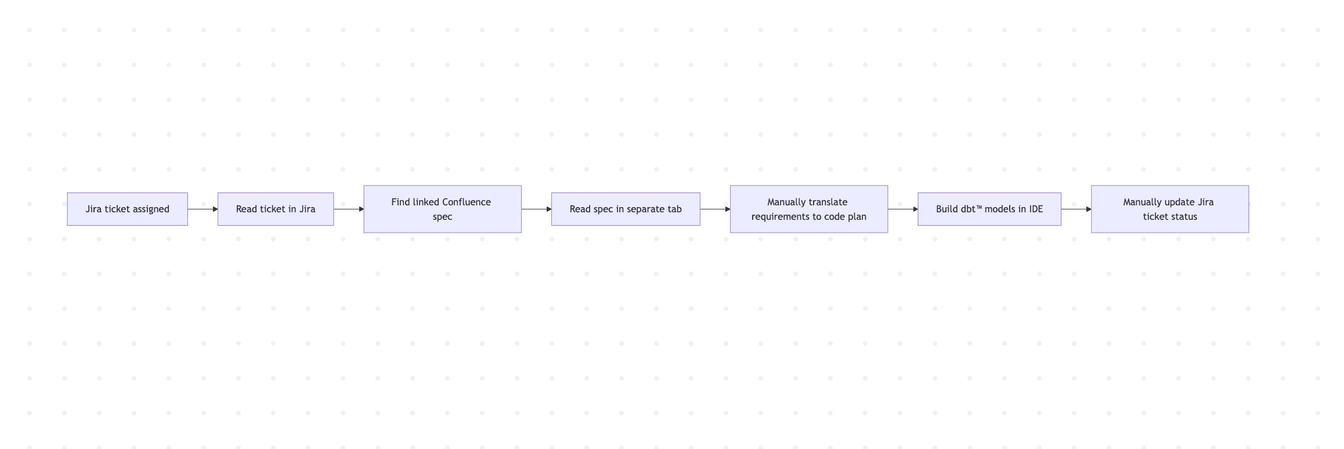
Every step between B and F is context-switching. With the Jira and Confluence tools, DinoAI handles the translation:
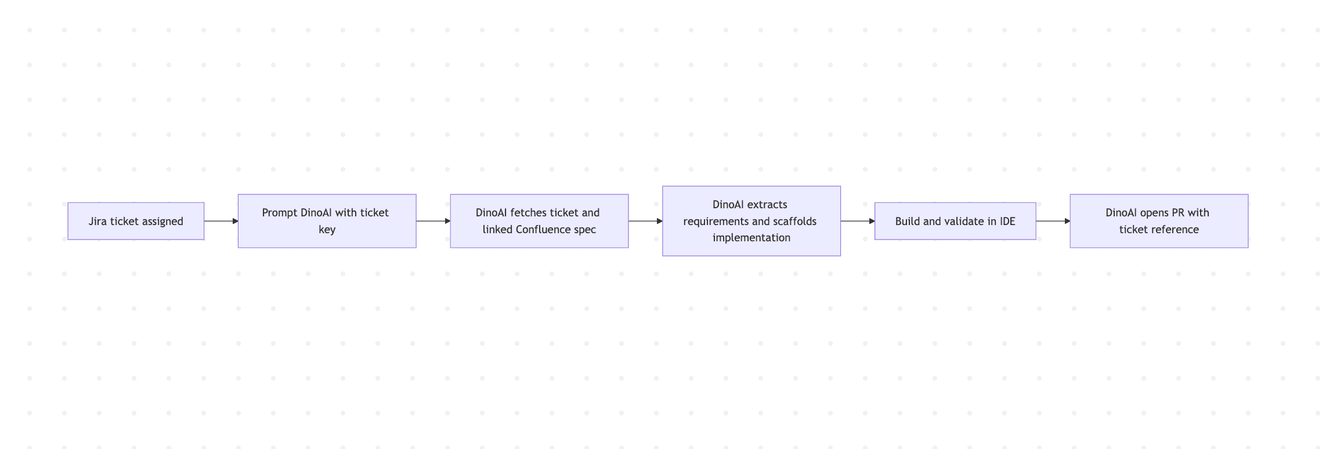
The planning context and the implementation context become the same context.
Workflow 1: Jira Ticket → dbt™ Implementation
The most direct use of the Jira Tool: hand DinoAI a ticket and ask it to implement the work. This works best when tickets are written with clear descriptions and acceptance criteria — which is good motivation for the team to write them well.
Implement the feature described in DATA-456.
Scaffold the required dbt™ models and tests,
run dbt build to validate, and open a draft PR
referencing DATA-456 in the title.
DinoAI reads the ticket, identifies the models to build, writes the SQL and YAML, validates with dbt build via the Terminal Tool, and opens a PR with the ticket key in the title — all from one prompt. The branch name follows the ticket convention (feature/DATA-456) automatically when you specify it.
For tickets that describe data requirements rather than technical tasks, DinoAI can interpret intent as well as explicit instruction — translating business requirements into staging layers, dimension tables, and mart-level models, then surfacing any ambiguities for you to resolve before it builds.
Workflow 2: Confluence Spec → dbt™ Models and Tests
Technical design documents in Confluence often contain the most complete picture of what a data model should do — entity definitions, business logic, field-level descriptions, edge cases. DinoAI can read that page and use it as the source of truth for building.
Read Confluence page 987654321.
Extract the data model requirements and build the corresponding
dbt™ staging and mart models. Use the field definitions in the page
to write YAML descriptions. Open a PR when done.
DinoAI retrieves the page, parses the structured content, and uses it to drive model scaffolding, YAML documentation, and test generation. Field descriptions in the Confluence page become description entries in the schema.yml. Entity definitions become model-level docs. The result is a PR where the code and documentation are grounded in the same source document that the team agreed on.
This mirrors the Google Docs workflow for teams using Atlassian instead of Google Workspace — same pattern, different source of truth.
Workflow 3: Cross-Referencing Jira and Confluence Together
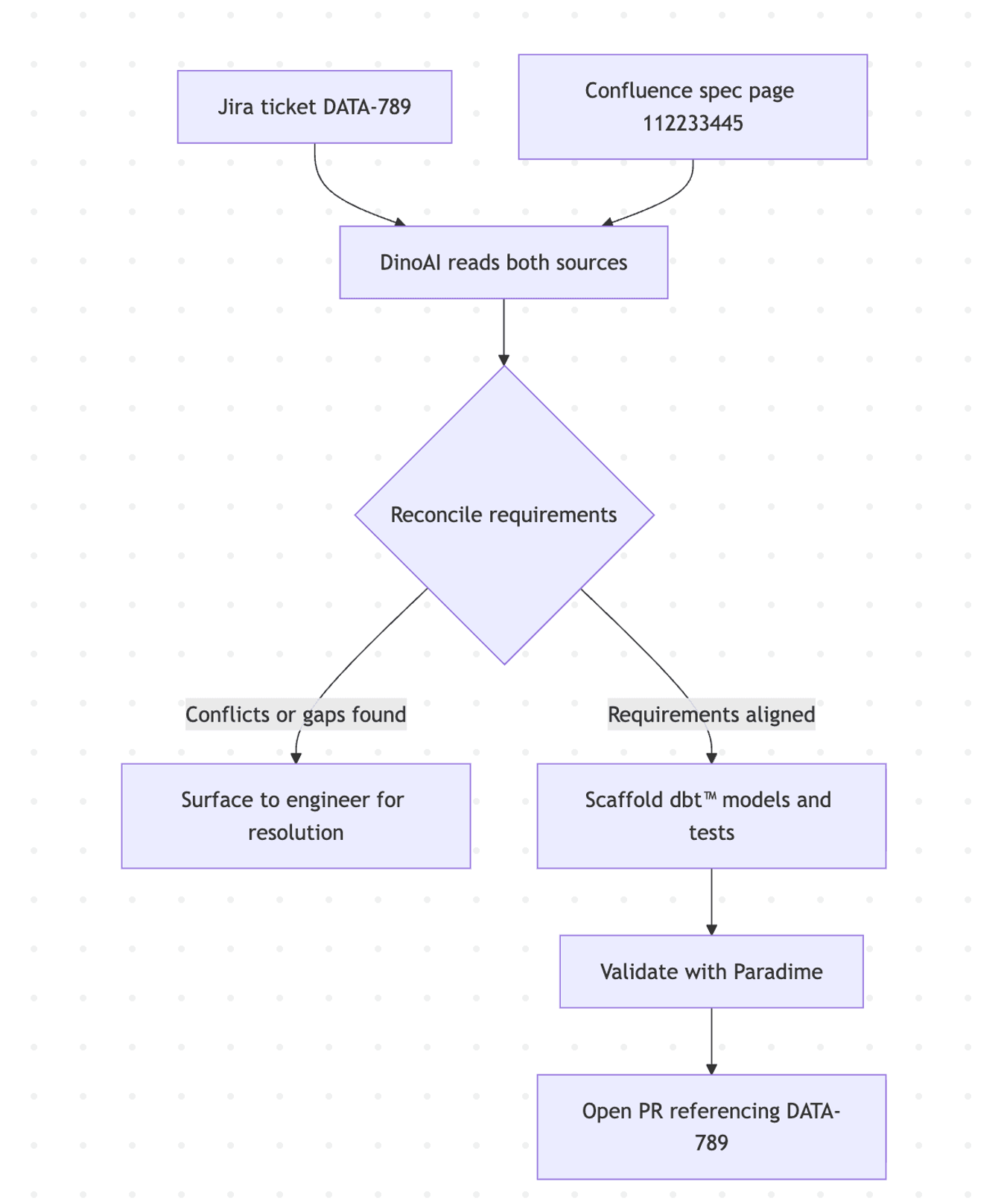
The most complete planning picture usually involves both tools. A Jira ticket describes the task and acceptance criteria; a linked Confluence page contains the technical specification. DinoAI can read both and reconcile them before building.
Read Jira ticket DATA-789 and its linked Confluence spec (page 112233445).
Summarise the acceptance criteria from the ticket and the technical
requirements from the spec. Flag any conflicts or gaps between the two.
Then scaffold the dbt™ implementation.
DinoAI fetches both, compares the acceptance criteria against the technical design, flags anything that doesn't line up — a field in the spec that isn't mentioned in the ticket, an acceptance criterion the spec doesn't address — and surfaces those for you before writing any code. This catches the mismatches that normally only surface mid-implementation, when they're more expensive to fix.
Workflow 4: Resolving a Production Issue from a Jira Ticket
When a production model fails and the details are captured in a Jira incident ticket — error messages, affected models, when it started — DinoAI can read that context and help diagnose and fix the issue directly.
I have a production failure documented in PROD-88.
Read the ticket, identify the failing model and error,
create a hotfix branch called hotfix/PROD-88,
apply a fix, run dbt test --select <affected_model>,
and open a PR referencing PROD-88.
DinoAI reads the error context from the ticket, checks the referenced model, applies a fix, validates it, and opens a PR — with the incident ticket ID in the title for traceability. For incidents where the error description in the ticket is ambiguous, DinoAI will ask for clarification before making changes.
This is especially useful for on-call rotations where the engineer picking up an incident didn't write the original model. The ticket provides enough context for DinoAI to get them up to speed and working toward a fix without extensive manual archaeology.
Workflow 5: Extracting Acceptance Criteria as a Pre-Build Checklist
Before building anything complex, it's worth being explicit about what "done" looks like. DinoAI can read a Jira ticket or Confluence page and extract acceptance criteria into a structured checklist you can work through and verify as you build.
Read Jira ticket DATA-312 and extract all acceptance criteria
as a numbered checklist. For each criterion, tell me which
dbt™ model or test will satisfy it.
DinoAI returns a checklist mapping each acceptance criterion to a specific model, test, or YAML entry. This makes the build plan explicit before any code is written and creates a natural review artifact — the PR description can include the checklist, making it easy for reviewers to verify that each criterion was addressed.
A Few Things Worth Knowing
Ticket quality drives output quality. DinoAI can only work with what's in the ticket. Acceptance criteria written as vague bullet points produce vague implementation plans. The same effort your team puts into writing clear tickets pays back directly in how useful DinoAI's interpretation is. This is a good forcing function for improving ticket hygiene.
Use page IDs, not URLs, for Confluence. The Confluence Tool works with page IDs (the numeric ID in the Confluence URL). Find it in the page URL — for https://yoursite.atlassian.net/wiki/spaces/DATA/pages/123456789/Page+Title, the page ID is 123456789.
Cross-reference before building. When both a Jira ticket and a Confluence spec exist for the same work, always give DinoAI both. The reconciliation step — catching gaps between what the ticket says and what the spec describes — is where the most value is, and it's essentially free when DinoAI is doing the reading.
Anchor PRs and commits to ticket IDs. Ask DinoAI to include Jira issue keys in branch names, PR titles, and commit messages by default. Traceability from dbt™ model back to the ticket that mandated it is what makes code review and incident response faster downstream.
Combine with the GitHub PR Management Tool for the full loop. The GitHub PR Management Tool closes the circle — Jira ticket in, PR out, with the ticket reference embedded throughout. The combined workflow covers planning → implementation → review without manual handoffs.
Getting Started
Both tools are available inside DinoAI's Agent Mode in the Paradime Code IDE right panel. Each requires a connected account — setup links below.
Full tool docs: Confluence Tool · Jira Tool · GitHub PR Management Tool · Terminal Tool · Agent Mode
Integration setup: Confluence · Jira
Related reading: From Google Workspace to dbt™ Code: AI Workflows with DinoAI · From dbt™ Code to Merged PR: GitHub Pull Request Management with DinoAI
FAQ
What is the DinoAI Confluence Tool? It fetches page content from Confluence Cloud or Data Center and makes it available as context for DinoAI — letting you turn specs, technical designs, and standards documents into dbt™ models, tests, and documentation without switching tabs.
What is the DinoAI Jira Tool? It fetches ticket details by issue key or URL, extracting requirements, acceptance criteria, and error context so DinoAI can implement features, resolve incidents, and trace code changes back to the tickets that motivated them.
Can I use the Confluence and Jira tools together? Yes — and that's where they're most powerful. Give DinoAI both a Jira ticket and its linked Confluence spec, and it will reconcile the two sources before building, surfacing any gaps or conflicts between acceptance criteria and technical design.
What Confluence versions are supported? The Confluence Tool supports both Confluence Cloud and Confluence Data Center.
How do I find a Confluence page ID? The page ID is the numeric string in the Confluence page URL. For https://yoursite.atlassian.net/wiki/spaces/DATA/pages/123456789/Page+Title, the page ID is 123456789.
Does DinoAI update Jira ticket status automatically? Not automatically — but you can ask DinoAI to include the ticket ID in PR titles, branch names, and commit messages, creating clear traceability. Ticket status updates in Jira are a manual step for now.
What if the Jira ticket is vague or incomplete? DinoAI will surface ambiguities before building. If acceptance criteria are missing or the description is unclear, it will ask for clarification rather than making assumptions — which is another reason to write thorough tickets.
Can DinoAI resolve a production incident from a Jira bug ticket? Yes. If the ticket contains enough context — the failing model, error message, and affected date range — DinoAI can read it, diagnose the issue, create a fix branch, apply and test the fix, and open a PR referencing the incident ticket.
Interested to Learn More? Try Out the Free 14-Days Trial
One AI-native workspace to build, ship, and monitor dbt™ — without the tool sprawl.
More Articles
Join industry leaders winning with DinoAI agents
Data engineers and analysts at the most AI-native startups and enterprises use Paradime's DinoAI agents everyday to become market leaders.