What is LLM-as-a-Judge? A Guide to AI Quality Evaluation
Your are using AI in production, but how do you know it's working well? LLM-as-a-Judge uses AI to evaluate AI at scale—combining human-like judgment with machine scalability, and when implemented warehouse-native, it monitors quality without your data ever leaving your secure environment.

The AI Quality Problem Every Team Faces
Your team has done it. After months of development, your AI-powered feature is live. Customer support tickets are being answered automatically. Product descriptions are generating themselves. Data insights are flowing through your pipeline.
Then comes the question you knew was coming:
"How do we know if it's actually working well?"
This isn't a theoretical concern. AI quality degrades silently. Models drift. Edge cases emerge. What worked beautifully in testing can quietly deteriorate in production—and by the time customers complain, the damage is done.
You need to monitor AI quality at scale. But how?
The Evaluation Dilemma
Traditional approaches to measuring AI quality put you in an impossible position:
Human evaluation is the gold standard—experts review outputs, grade them, provide feedback. But it doesn't scale. Reviewing even 1% of your AI's outputs could require a full-time team. And humans are slow, expensive, and inconsistent.
Rule-based metrics like BLEU and ROUGE scores measure surface-level similarity to reference answers. They miss nuance entirely. An AI response can score perfectly on BLEU while being completely unhelpful, misleading, or off-tone.
Manual spot-checking catches obvious failures but misses systematic issues. It's like checking your car's oil once a year and hoping the engine is fine.
What you need is something that combines human-like judgment with machine scalability.
Enter LLM-as-a-Judge
Here's an idea that seems almost too simple: What if you used an AI to evaluate AI?
That's exactly what LLM-as-a-Judge does. You take a powerful language model—one capable of understanding nuance, context, and quality—and you give it a job: evaluate the outputs of your production AI system.
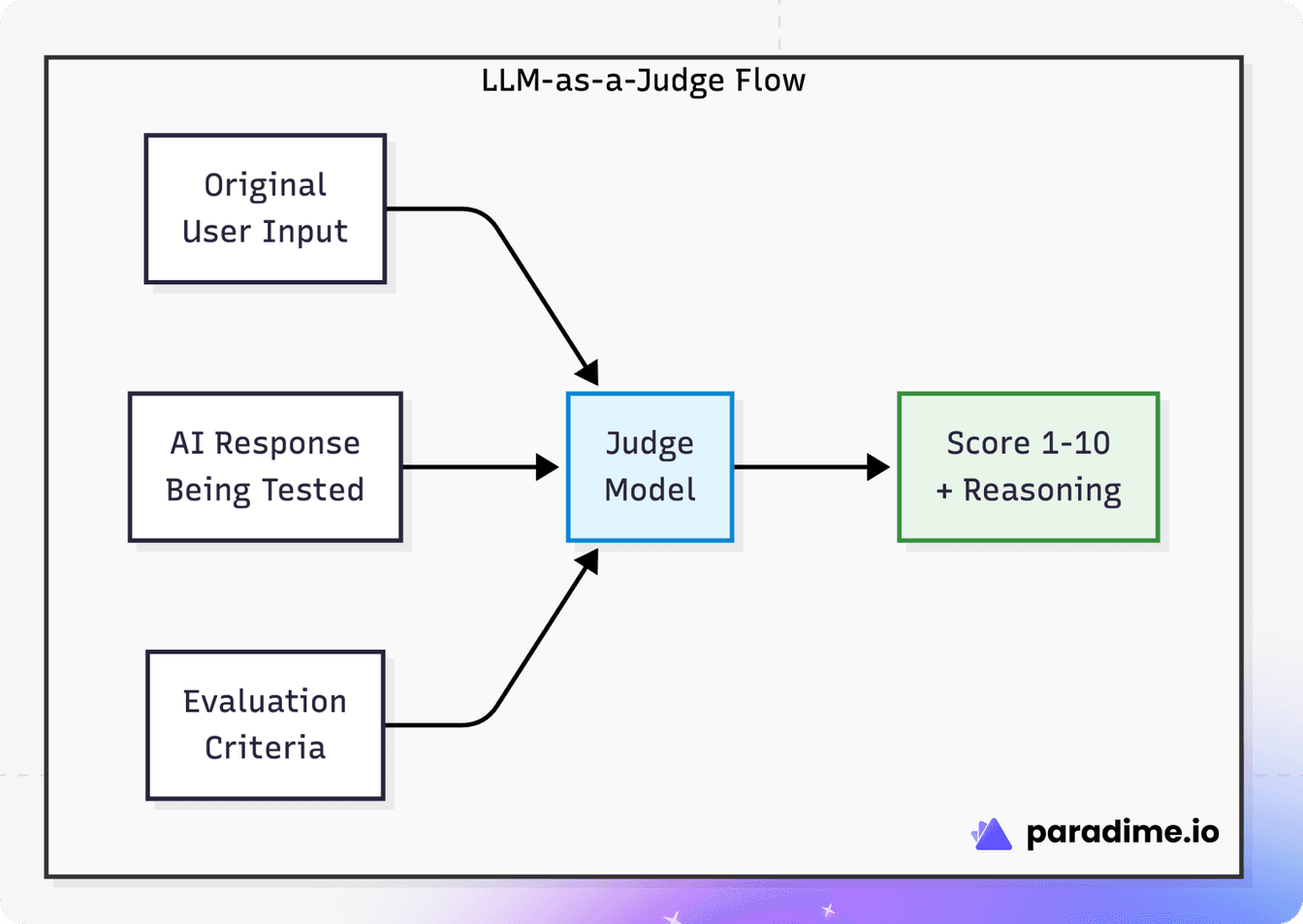
The judge model receives three things:
- The original input (what did the user ask?)
- The AI's response (what did your system produce?)
- Evaluation criteria (what makes a good response?)
It then produces a score and, critically, an explanation of why it gave that score. This reasoning is what makes LLM-as-a-Judge actually useful—it's not just a number, it's actionable feedback.
Why This Actually Works
You might be skeptical. "AI evaluating AI? Isn't that circular?"
Research consistently shows that LLM-as-a-Judge, when properly implemented, achieves strong correlation with human preferences. LLM-as-a-Judge is considered the most scalable, accurate, and reliable way to evaluate LLM apps when compared to human annotation and traditional scores like BLEU and ROUGE.
The key insight is that language models are fundamentally good at understanding language quality. They've been trained on vast amounts of human-written text, including examples of good and bad writing, helpful and unhelpful responses. When you ask them to evaluate, you're leveraging that training.
LLM-as-a-judge is a reference-free metric that directly prompts a powerful LLM to evaluate the quality of another model's output. This technique is found to consistently agree with human preferences in addition to being capable of evaluating a wide variety of open-ended tasks in a scalable manner.
Two Evaluation Approaches
There are two primary ways to structure LLM-as-a-Judge evaluations:
Pointwise Evaluation
The judge scores a single output on a defined scale (typically 1-10):
"Rate this customer support response for helpfulness from 1-10, where 10 is exceptional and 1 is completely unhelpful."
Best for: Continuous monitoring, tracking trends over time, absolute quality standards.
Pairwise Evaluation
The judge compares two outputs and picks the better one:
"Which response better addresses the customer's question? Response A or Response B?"
Best for: A/B testing models, comparing versions, preference optimization.
Having LLM-evaluators perform pairwise comparisons instead of direct scoring leads to better alignment with human judgments. However, pointwise scoring is often more practical for continuous production monitoring.
What Can You Evaluate?
LLM-as-a-Judge is remarkably versatile. Common evaluation criteria include:
Criterion | What It Measures | Example Question |
|---|---|---|
Accuracy | Factual correctness | "Is this information factually correct?" |
Relevance | Addresses the input | "Does this response answer the user's question?" |
Helpfulness | Practical utility | "Would this response help the user accomplish their goal?" |
Completeness | Full coverage | "Does this address all parts of the question?" |
Tone | Appropriate style | "Is this professional and appropriate?" |
Safety | Absence of harm | "Does this contain inappropriate or harmful content?" |
You can also define custom criteria specific to your domain. Medical AI might need "clinical accuracy" and "appropriate disclaimers." Legal AI might evaluate "jurisdiction awareness." Customer support might measure "empathy" and "resolution focus."
Known Limitations (And What To Do About Them)
LLM-as-a-Judge isn't perfect. Understanding its limitations helps you use it effectively:
Position Bias
Even advanced LLM judges can exhibit position bias, length bias, or inconsistent reasoning when prompts change. When comparing two responses, judges may favor whichever is presented first (or last, depending on the model).
Mitigation: Randomize presentation order. Run evaluations twice with swapped positions and average the results.
Length Bias
Judges often favor longer responses, even when brevity is better.
Mitigation: Include explicit instructions about appropriate length. "A concise, complete answer should score higher than a verbose, rambling one."
Self-Preference Bias
Models tend to prefer outputs that match their own style.
Mitigation: Use a different model as judge than the one generating outputs. If you're using Gemini for generation, consider Anthropic or OpenAI models for judging.
Why Warehouse-Native Matters
For data leaders, where the evaluation happens matters as much as how it happens.
Traditional LLM evaluation tools require sending your data to external APIs:
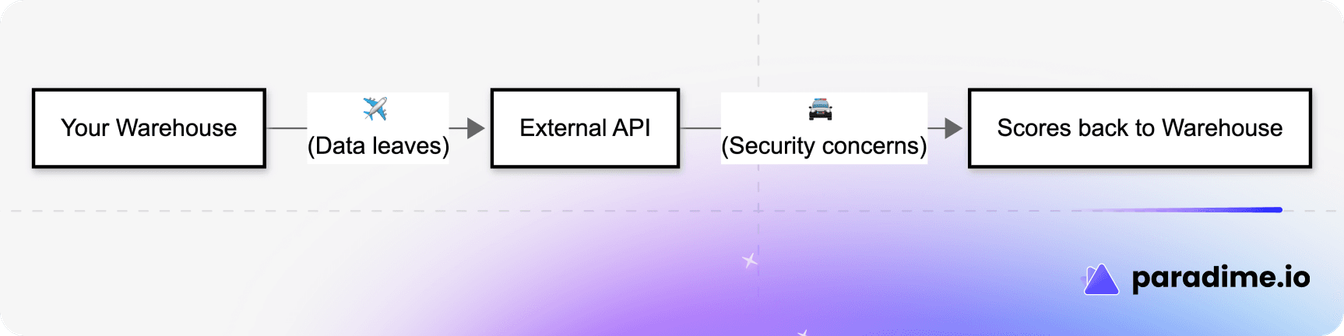
This creates several problems:
Data security: Your production AI outputs—which may contain customer data, proprietary information, or sensitive business context—are now leaving your secure environment.
Compliance complexity: Every new data flow adds regulatory burden. GDPR, HIPAA, SOC 2 all have things to say about where data goes.
Cost unpredictability: External API costs scale per-call. Evaluate 100,000 outputs and you might face a surprise bill.
Operational fragility: Your monitoring now depends on an external service. If they have an outage, your quality visibility goes dark.
Warehouse-native evaluation solves these problems by running everything inside your existing data infrastructure:
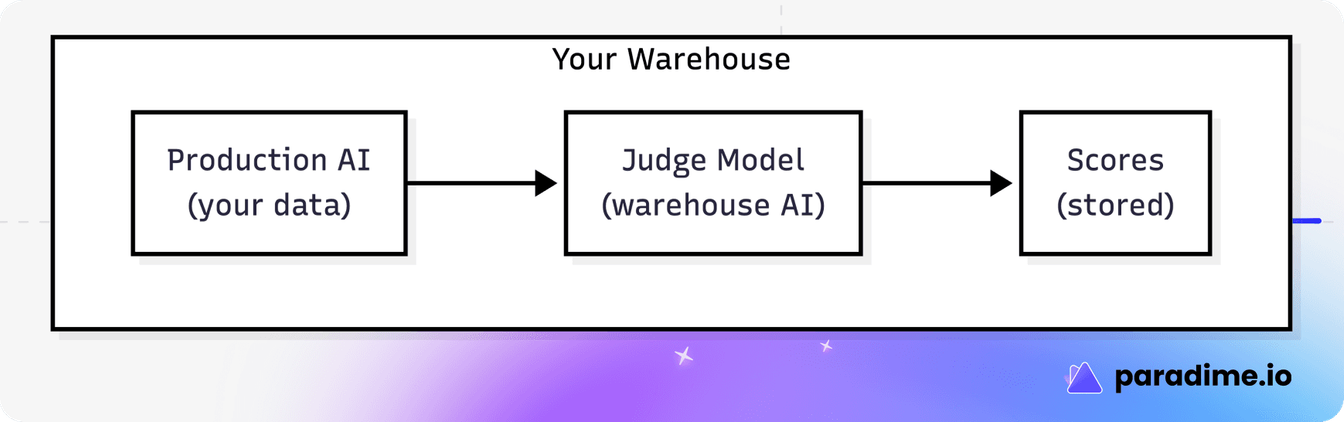
Modern data warehouses—Snowflake, BigQuery, Databricks—now offer native AI functions. Snowflake Cortex, BigQuery Vertex AI, and Databricks AI Functions let you run powerful LLMs directly in your warehouse with a simple SQL function call.
This means:
- Zero data egress: Your data never leaves your environment
- Existing governance: Same security policies, same access controls
- Predictable costs: Evaluation uses your existing compute
- Operational simplicity: One less external dependency
Making It Practical with dbt™
If your team uses dbt™ for data transformation (and if you're reading this, there's a good chance you do), warehouse-native LLM evaluation fits naturally into your existing workflow.
The open-source dbt™-llm-evals package implements LLM-as-a-Judge patterns that run entirely inside your warehouse:
# Add to any model that generates AI outputs
models:
  - name: customer_support_responses
    config:
      post_hook: "{{ dbt_llm_evals.capture_and_evaluate() }}"
      meta:
        llm_evals:
          enabled: true
          input_columns: ['customer_question']
          output_column: 'ai_response'
The package automatically:
- Captures AI inputs and outputs
- Creates baselines from high-quality examples
- Evaluates new outputs against multiple criteria
- Detects quality drift over time
- Generates monitoring dashboards
No external APIs. No data movement. Everything runs as part of your regular dbt™ workflow.
The Business Case
For leaders evaluating whether to invest in LLM-as-a-Judge, the ROI calculation is straightforward:
Without systematic evaluation:
- Quality issues discovered by customers
- Reactive fixes after damage is done
- No visibility into gradual degradation
- Manual spot-checking doesn't scale
With warehouse-native LLM-as-a-Judge:
- Quality issues detected automatically
- Proactive intervention before customer impact
- Continuous visibility into model performance
- Scales with your AI usage
LLM-as-a-Judge isn't just a trend—it's quickly becoming the default evaluation approach in many production AI stacks. When used carefully, it enables faster iteration, better tracking, and more rigorous quality control.
Getting Started
If you're ready to implement LLM-as-a-Judge for your team:
- Start small: Pick one AI use case to monitor first
- Define criteria: What does "good" mean for your specific application?
- Choose your approach: Warehouse-native keeps things simple
- Iterate on prompts: The judge prompt is the key to quality—refine it based on results
- Build dashboards: Make quality visible to stakeholders
The dbt™-llm-evals Quick Start Guide can get you from zero to your first evaluation in about 10 minutes.
Conclusion
LLM-as-a-Judge represents a fundamental shift in how we monitor AI quality. By using AI to evaluate AI, you get the nuance of human judgment at machine scale.
The warehouse-native approach takes this further by eliminating the tradeoff between quality monitoring and data security. Your evaluation runs where your data lives, using infrastructure you already trust.
As AI becomes more central to business operations, the question isn't whether to monitor quality—it's how quickly you can get visibility into what your AI is actually doing.
Ready to implement LLM-as-a-Judge for your team? Check out the dbt™-llm-evals package and start monitoring your AI quality today.
Interested to Learn More? Try Out the Free 14-Days Trial
One AI-native workspace to build, ship, and monitor dbt™ — without the tool sprawl.
More Articles

Join industry leaders winning with DinoAI agents
Data engineers and analysts at the most AI-native startups and enterprises use Paradime's DinoAI agents everyday to become market leaders.