From dbt™ Code to Merged PR: GitHub Pull Request Management with DinoAI
Most analytics engineers don't think of pull request management as a productivity problem — it's just the last mile. You finish the work, switch to GitHub, write a description, check CI in another tab, respond to review comments somewhere else. DinoAI's GitHub PR Management Tool makes the last mile part of the development loop: create PRs, read diffs and reviewer feedback, and monitor what's in flight — all from inside the Paradime IDE, chained directly into the workflow that built the code.

Fabio Di Leta
·
6
min read
Most analytics engineers don't think of pull request management as a productivity problem — it's just the last mile. You finish the work, switch to GitHub, write a description that's either too long or too vague, check on CI status a few tabs later, respond to review comments in one place while the code lives in another, and eventually it ships. The overhead feels normal because it's always been there.
DinoAI's GitHub PR Management Tool makes the last mile part of the development loop. Create PRs, read diffs and reviewer feedback, and monitor what's in flight — all from inside the Paradime IDE, chained directly into the workflow that produced the code in the first place.
Requires GitHub integration. Connect your GitHub account in Paradime before using this tool. See the GitHub integration setup guide for instructions.
What the Tool Actually Does
The GitHub PR Management Tool exposes three actions DinoAI can perform against your connected GitHub repository:
create_pull_request — Opens a new PR from a specified branch, with support for title, body, branch selection, and draft mode.
read_pull_request — Fetches the full details of an existing PR by number: code diffs, CI status, reviewer comments, and review state.
list_pull_requests — Discovers and filters PRs across your repository by state, branch, and sort order, with pagination support.
Together, these three actions cover the full PR lifecycle — from opening a branch PR the moment work is ready for visibility, to reading reviewer feedback without leaving the IDE, to getting a clear picture of what's in flight across your team.
How DinoAI Changes the PR Workflow
The typical dbt™ → PR handoff looks like this:
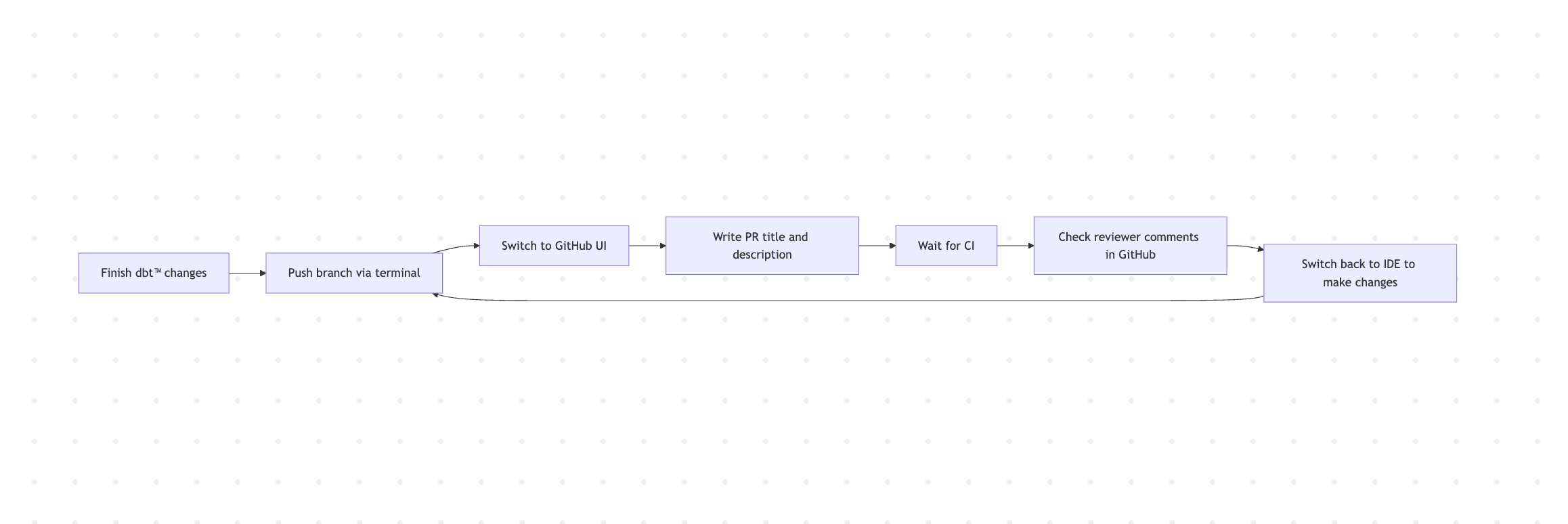
Every switch between IDE and GitHub is a context break. With the GitHub PR Management Tool, DinoAI handles the GitHub-side actions from inside the same workflow that built the code:
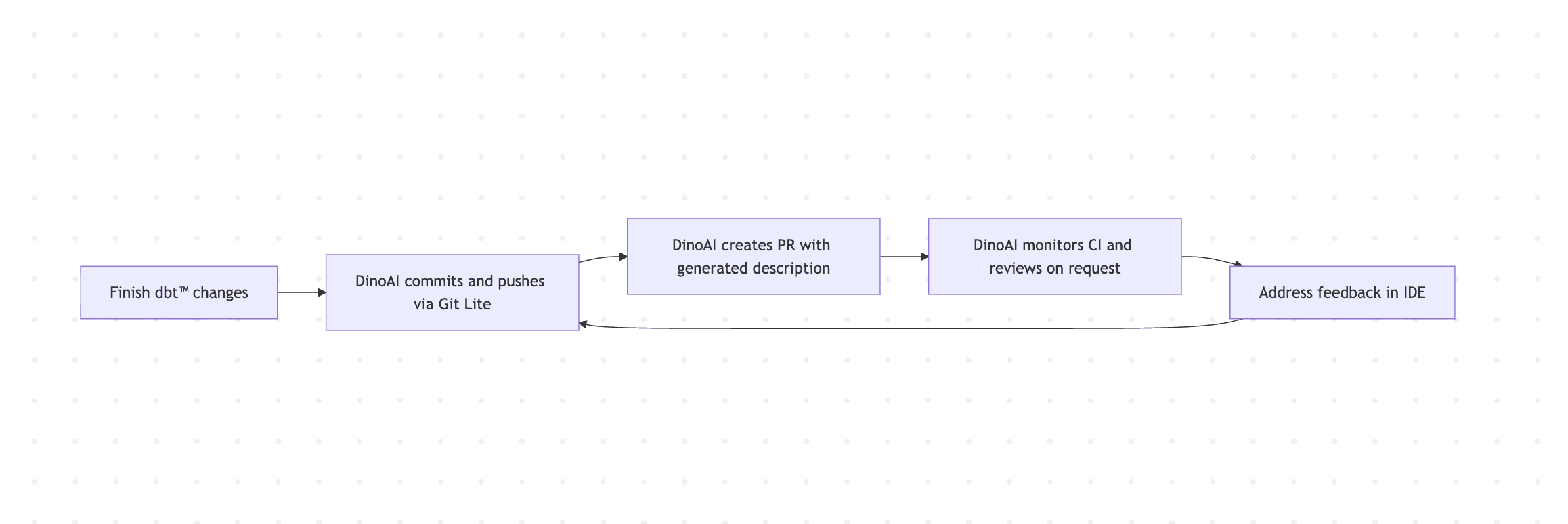
The IDE becomes the single place where development and code review management happen together.
Workflow 1: Spec to PR in One Agent Mode Run
The most complete use of the GitHub PR Management Tool is as the final step in a full DinoAI Agent Mode workflow. After building, testing, and validating, DinoAI opens the PR — with a description that actually explains what changed and why.
DinoAI chains Google Docs → File System → Terminal → GitHub PR in a single workflow. The PR description is generated from the same context DinoAI used to build the models — which means it's accurate and useful for reviewers, not a placeholder.
This pairs directly with the Google Workspace workflows already available in DinoAI: read a spec, build the code, open the PR, all from one prompt.
Workflow 2: Opening a Draft PR Early for Team Visibility
Draft PRs are underused on most data teams. They're the right tool for signalling that work is in progress, getting early eyes on an approach, and making sure CI starts running before the work is marked ready for review. The friction of opening them manually keeps most engineers from bothering.
DinoAI opens the draft PR immediately, keeping the branch visible without blocking the team. When the work is complete, a follow-up prompt can update the description and mark it ready for review.
Workflow 3: Reading Reviewer Feedback Without Leaving the IDE
Responding to PR review comments normally means switching to GitHub, reading the diff in that context, switching back to the IDE to make changes, and repeating. With the read_pull_request action, DinoAI brings the review into the IDE.
DinoAI fetches the PR details — diff, CI status, and all reviewer comments — summarises what's being asked, and identifies which files need attention. You can then address the feedback directly in the IDE and ask DinoAI to push the changes and add a review response comment, all without switching context.
This is particularly useful for larger PRs where reviewer feedback spans multiple files and threads. DinoAI can triage the comments, prioritise what needs addressing, and help you work through them systematically.
Workflow 4: Monitoring What's In Flight Across the Team
For team leads and senior engineers who need visibility across multiple open PRs — checking CI status, identifying PRs that have been waiting for review, or finding branches that need attention — the list_pull_requests action gives that picture on demand.
DinoAI queries the repository, returns the filtered PR list, and surfaces CI and review state per PR. This replaces a manual scan of the GitHub PRs tab — useful at the start of a review session or a standup where you need to know what's blocked.
Workflow 5: Linking PRs to Linear Issues
Keeping Linear tickets and GitHub PRs connected matters for traceability — when a PR is merged, you want to know which ticket it addressed, and when a ticket is closed, you want to know which changes shipped it. DinoAI can reference Linear issue IDs directly in PR titles and descriptions when creating PRs.
DinoAI creates the PR with the Linear issue reference in the title (e.g. feat: add dim_customers model [ENG-412]) and includes the Linear issue URL in the description body. Combined with the Linear Tool, DinoAI can also update the ticket status when the PR is opened — closing the loop between code and task tracking without manual updates.
A Few Things Worth Knowing
Open draft PRs early, not late. The best time to open a draft PR is when the branch is first pushed — not when the work is finished. Draft mode signals intent, triggers CI, and gives teammates visibility. DinoAI makes this cheap enough to do by default.
Include context when creating PRs. The more you tell DinoAI about what changed and why, the better the generated PR description. Reference the spec, the ticket, or the problem being solved. Reviewers will thank you.
Use read_pull_request before responding to reviews. Instead of switching to GitHub to read comments, ask DinoAI to fetch and summarise the review. Then address the feedback in the IDE and ask DinoAI to push the update. The round-trip happens without a context switch.
Combine with the Terminal Tool for pre-PR validation. Before opening a PR, run dbt build or dbt test via the Terminal Tool to confirm everything passes. DinoAI can make this a prerequisite step in the same chained prompt that opens the PR.
Permissions matter. DinoAI will request permission each time it interacts with GitHub. You'll need appropriate repository access for PR creation, reading, and listing to work correctly.
Getting Started
The GitHub PR Management Tool is available inside DinoAI's Agent Mode in the Paradime Code IDE right panel. It requires a connected GitHub account — setup instructions are in the GitHub integration guide.
Full tool docs: GitHub PR Management Tool · Terminal Tool · Linear Tool · Agent Mode
Related reading: From Google Workspace to dbt™ Code: AI Workflows with DinoAI · Write SQL, Run It, Fix It: In-IDE Query Execution with DinoAI
FAQ
What is the DinoAI GitHub PR Management Tool? It's a DinoAI capability that lets you create, read, and list GitHub pull requests directly from the Paradime IDE — keeping PR management inside the same workflow where you write and validate your dbt™ code.
What GitHub actions can DinoAI perform? Three: create a pull request (with title, body, branch, and draft mode support), read a pull request by number (including diffs, CI status, and reviewer comments), and list pull requests with filtering by state, branch, and sort order.
Does DinoAI need special GitHub permissions? You need appropriate access to the connected GitHub repository. DinoAI will request permission each time it interacts with GitHub on your behalf.
Can DinoAI respond to reviewer comments? DinoAI can read reviewer comments and summarise them. For responding, it can help you address the feedback in the IDE and push the updated code. Direct comment replies via the tool are not currently supported — those happen in GitHub.
Can DinoAI link PRs to Linear or Jira tickets? Yes. When creating a PR, instruct DinoAI to include the ticket ID in the title and a link in the description. Combined with the Linear Tool or Jira Tool, DinoAI can also update the ticket status when the PR is opened.
What happens if CI fails after DinoAI opens a PR? Ask DinoAI to read the PR — it will fetch the CI status along with the diff and comments. If the failure is in a dbt™ test or compilation step, DinoAI can help diagnose and fix it in the IDE, then push the corrected code to the same branch.