Complete Guide to Running Python in dbt™ Models: From Basics to Production-Ready Workflows
Transform complex data workflows with Python models while keeping all the benefits of dbt's™ lineage, testing, and documentation.

Fabio Di Leta
·
·
10
min read
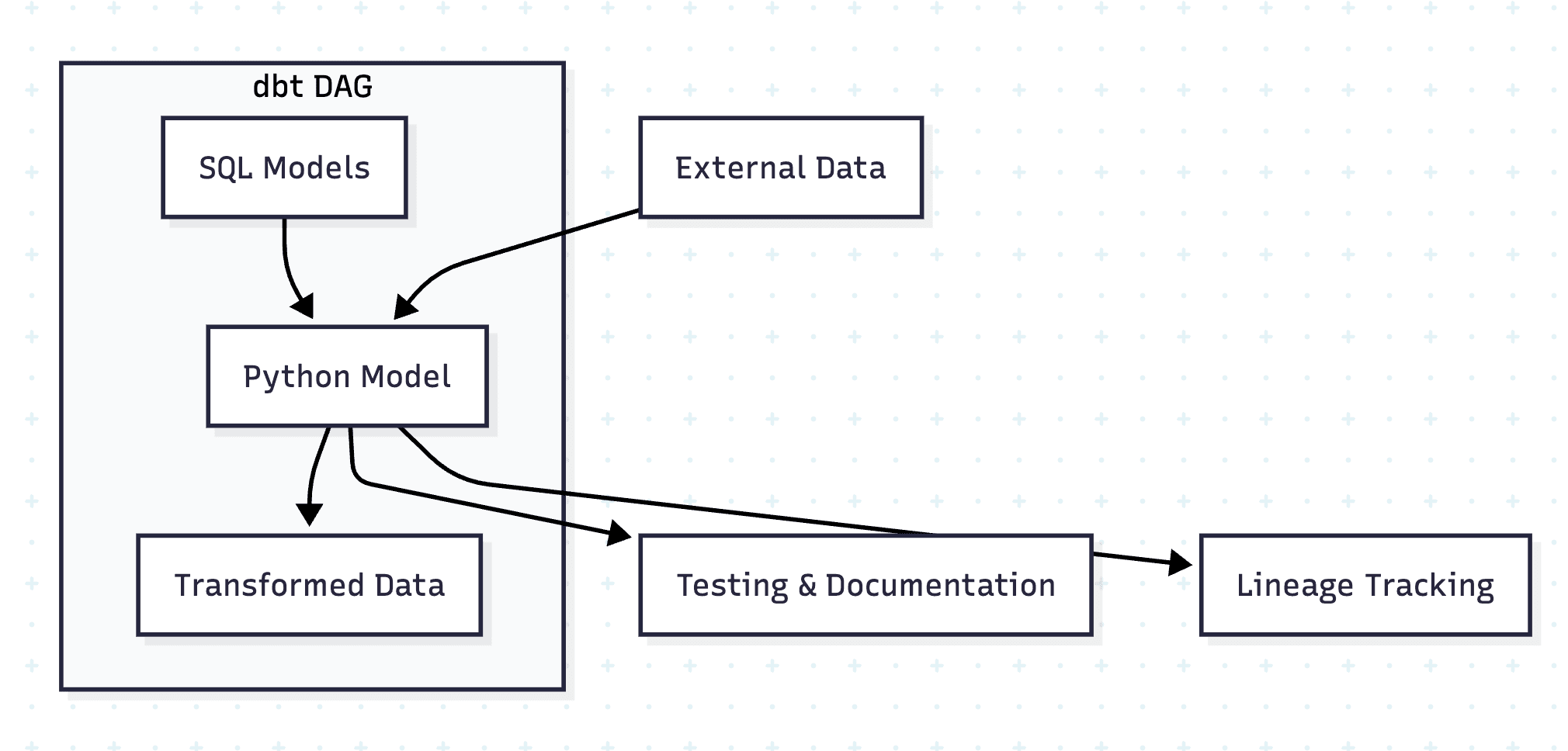
Python models in dbt™ represent a powerful extension to the traditional SQL-first approach, enabling data teams to leverage the rich Python ecosystem while maintaining all the benefits of dbt's™ lineage, testing, and documentation features. This comprehensive guide demonstrates how to implement Python models effectively, using real-world Formula 1 data examples.
Table of Contents
Understanding dbt™ Python Models
Python models in dbt™ are defined in .py files within your models/ directory and must contain a model() function that accepts two parameters:
dbt: A context object for accessing refs, sources, and configurationsession: Your data platform's connection to the Python runtime
Platform Support
Python models require a data platform with a fully-featured Python runtime. Currently supported platforms include:
Snowflake (Snowpark)
BigQuery (BigQuery DataFrames)
Databricks (PySpark)
For complete platform-specific documentation, refer to the official dbt™ Python models guide.
When to Use Python Models
Python models should be used strategically for transformations that are:
✅ Good Use Cases
Complex mathematical operations
Advanced statistical analysis
Machine learning model inference
Data science workflows requiring specialized libraries
Transformations that are awkward or impossible in SQL
❌ Avoid Python For
Simple aggregations
Basic joins and filters
Standard data cleaning operations
Anything efficiently handled by SQL
Basic Structure and Syntax
Every Python model follows this fundamental pattern:
def model(dbt, session):
    """
    Basic structure of a dbt Python model.

    This is the absolute minimum required for a Python model.
    Every Python model must follow this exact structure.

    Args:
        dbt: A dbt context object for accessing refs, sources, and config
        session: Your data platform's connection to Python runtime

    Returns:
        A DataFrame (pandas, Snowpark, BigFrames, or PySpark)
    """

    # Set configuration
    dbt.config(materialized='table')

    # Load upstream data from F1 project
    df = dbt.ref('stg_f1__drivers').to_pandas()

    # Normalize column names (important for Snowflake!)
    df.columns = df.columns.str.lower()

    # Your transformation logic here
    # Calculate driver age from date of birth
    import pandas as pd
    df['date_of_birth'] = pd.to_datetime(df['date_of_birth'])
    df['age_years'] = ((pd.Timestamp.now() - df['date_of_birth']).dt.days / 365.25).astype(int)

    # Return final DataFrame
    return df
def model(dbt, session):
    """
    Basic structure of a dbt Python model.

    This is the absolute minimum required for a Python model.
    Every Python model must follow this exact structure.

    Args:
        dbt: A dbt context object for accessing refs, sources, and config
        session: Your data platform's connection to Python runtime

    Returns:
        A DataFrame (pandas, Snowpark, BigFrames, or PySpark)
    """

    # Set configuration
    dbt.config(materialized='table')

    # Load upstream data from F1 project
    df = dbt.ref('stg_f1__drivers').to_pandas()

    # Normalize column names (important for Snowflake!)
    df.columns = df.columns.str.lower()

    # Your transformation logic here
    # Calculate driver age from date of birth
    import pandas as pd
    df['date_of_birth'] = pd.to_datetime(df['date_of_birth'])
    df['age_years'] = ((pd.Timestamp.now() - df['date_of_birth']).dt.days / 365.25).astype(int)

    # Return final DataFrame
    return df
def model(dbt, session):
    """
    Basic structure of a dbt Python model.

    This is the absolute minimum required for a Python model.
    Every Python model must follow this exact structure.

    Args:
        dbt: A dbt context object for accessing refs, sources, and config
        session: Your data platform's connection to Python runtime

    Returns:
        A DataFrame (pandas, Snowpark, BigFrames, or PySpark)
    """

    # Set configuration
    dbt.config(materialized='table')

    # Load upstream data from F1 project
    df = dbt.ref('stg_f1__drivers').to_pandas()

    # Normalize column names (important for Snowflake!)
    df.columns = df.columns.str.lower()

    # Your transformation logic here
    # Calculate driver age from date of birth
    import pandas as pd
    df['date_of_birth'] = pd.to_datetime(df['date_of_birth'])
    df['age_years'] = ((pd.Timestamp.now() - df['date_of_birth']).dt.days / 365.25).astype(int)

    # Return final DataFrame
    return df
Key Requirements
Model Function: Must be named
modeland acceptdbtandsessionparametersReturn Type: Must return a DataFrame compatible with your data platform
Configuration: Use
dbt.config()to set materialization and other optionsColumn Names: Always normalize column names (especially critical for Snowflake)
Configuration Patterns
Python models support powerful configuration options through both YAML and inline Python configuration:
YAML Configuration
# __example_config_access.yml
version: 2

models:
  - name: example_config_access
    description: |
      Example model demonstrating configuration access patterns using F1 data.

      Shows how to use dbt.config.get() to access Jinja-rendered
      values like target, vars, and env_vars in Python models.

    config:
      materialized: table
      target_name: "{{ target.name }}"
      specific_var: "{{ var('SPECIFIC_VAR', 'default_value') }}"
      specific_env_var: "{{ env_var('SPECIFIC_ENV_VAR', 'default_env') }}"
      meta:
        custom_value: "111"
        sampling_rate: 0.1
# __example_config_access.yml
version: 2

models:
  - name: example_config_access
    description: |
      Example model demonstrating configuration access patterns using F1 data.

      Shows how to use dbt.config.get() to access Jinja-rendered
      values like target, vars, and env_vars in Python models.

    config:
      materialized: table
      target_name: "{{ target.name }}"
      specific_var: "{{ var('SPECIFIC_VAR', 'default_value') }}"
      specific_env_var: "{{ env_var('SPECIFIC_ENV_VAR', 'default_env') }}"
      meta:
        custom_value: "111"
        sampling_rate: 0.1
# __example_config_access.yml
version: 2

models:
  - name: example_config_access
    description: |
      Example model demonstrating configuration access patterns using F1 data.

      Shows how to use dbt.config.get() to access Jinja-rendered
      values like target, vars, and env_vars in Python models.

    config:
      materialized: table
      target_name: "{{ target.name }}"
      specific_var: "{{ var('SPECIFIC_VAR', 'default_value') }}"
      specific_env_var: "{{ env_var('SPECIFIC_ENV_VAR', 'default_env') }}"
      meta:
        custom_value: "111"
        sampling_rate: 0.1
Accessing Configuration in Python
def model(dbt, session):
    """
    Example showing how to access configuration values in Python models.

    Demonstrates accessing target name, variables, and meta values
    for conditional logic.
    """

    dbt.config(materialized='table')

    # Access configuration values set in YAML
    target_name = dbt.config.get('target_name')
    specific_var = dbt.config.get('specific_var')
    specific_env_var = dbt.config.get('specific_env_var')

    # Access meta values
    meta = dbt.config.get('meta')
    if meta:
        custom_value = meta.get('custom_value')
        sampling_rate = meta.get('sampling_rate')

    # Load F1 race results data
    results_df = dbt.ref('int_f1__race_results_standings').to_pandas()
    results_df.columns = results_df.columns.str.lower()

    # Use config values for conditional logic
    # Limit data in dev environment (e.g., only recent seasons)
    if target_name == 'dev':
        results_df = results_df[results_df['race_year'] >= 2020]

    # Apply sampling if configured
    if meta and sampling_rate:
        results_df = results_df.sample(frac=float(sampling_rate))

    return results_df
def model(dbt, session):
    """
    Example showing how to access configuration values in Python models.

    Demonstrates accessing target name, variables, and meta values
    for conditional logic.
    """

    dbt.config(materialized='table')

    # Access configuration values set in YAML
    target_name = dbt.config.get('target_name')
    specific_var = dbt.config.get('specific_var')
    specific_env_var = dbt.config.get('specific_env_var')

    # Access meta values
    meta = dbt.config.get('meta')
    if meta:
        custom_value = meta.get('custom_value')
        sampling_rate = meta.get('sampling_rate')

    # Load F1 race results data
    results_df = dbt.ref('int_f1__race_results_standings').to_pandas()
    results_df.columns = results_df.columns.str.lower()

    # Use config values for conditional logic
    # Limit data in dev environment (e.g., only recent seasons)
    if target_name == 'dev':
        results_df = results_df[results_df['race_year'] >= 2020]

    # Apply sampling if configured
    if meta and sampling_rate:
        results_df = results_df.sample(frac=float(sampling_rate))

    return results_df
def model(dbt, session):
    """
    Example showing how to access configuration values in Python models.

    Demonstrates accessing target name, variables, and meta values
    for conditional logic.
    """

    dbt.config(materialized='table')

    # Access configuration values set in YAML
    target_name = dbt.config.get('target_name')
    specific_var = dbt.config.get('specific_var')
    specific_env_var = dbt.config.get('specific_env_var')

    # Access meta values
    meta = dbt.config.get('meta')
    if meta:
        custom_value = meta.get('custom_value')
        sampling_rate = meta.get('sampling_rate')

    # Load F1 race results data
    results_df = dbt.ref('int_f1__race_results_standings').to_pandas()
    results_df.columns = results_df.columns.str.lower()

    # Use config values for conditional logic
    # Limit data in dev environment (e.g., only recent seasons)
    if target_name == 'dev':
        results_df = results_df[results_df['race_year'] >= 2020]

    # Apply sampling if configured
    if meta and sampling_rate:
        results_df = results_df.sample(frac=float(sampling_rate))

    return results_df
Working with Helper Functions
Define reusable helper functions within your Python models for cleaner, more maintainable code:
def calculate_performance_score(points: float, fastest_laps: int, podiums: int) -> float:
    """
    Calculate driver performance score based on points, fastest laps, and podiums.

    Args:
        points: Total championship points
        fastest_laps: Number of fastest laps
        podiums: Number of podium finishes

    Returns:
        Performance score between 0 and 100
    """
    # Weighted scoring formula
    score = (points * 0.6) + (fastest_laps * 5) + (podiums * 10)
    return min(100.0, score / 10)  # Normalize to 100

def calculate_driver_age(date_of_birth) -> int:
    """
    Calculate driver's current age from date of birth.

    Args:
        date_of_birth: Driver's date of birth

    Returns:
        Age in years
    """
    import pandas as pd
    from datetime import datetime

    if pd.isna(date_of_birth):
        return None

    today = datetime.now()
    dob = pd.to_datetime(date_of_birth)
    age = today.year - dob.year - ((today.month, today.day) < (dob.month, dob.day))
    return age

def model(dbt, session):
    """
    Example showing how to define and use helper functions in Python models.

    Demonstrates creating reusable functions within the same file
    and applying them to DataFrame columns.
    """

    dbt.config(materialized='table')

    import pandas as pd

    # Load driver data
    drivers_df = dbt.ref('stg_f1__drivers').to_pandas()
    drivers_df.columns = drivers_df.columns.str.lower()

    # Load race results to calculate statistics
    results_df = dbt.ref('stg_f1__results').to_pandas()
    results_df.columns = results_df.columns.str.lower()

    # Calculate driver statistics
    driver_stats = results_df.groupby('driver_id').agg({
        'points': 'sum',
        'fastest_lap': lambda x: x.notna().sum(),  # Count fastest laps
        'position': lambda x: (x <= 3).sum()  # Count podiums
    }).reset_index()

    driver_stats.columns = ['driver_id', 'total_points', 'total_fastest_laps', 'total_podiums']

    # Merge with driver info
    drivers_df = drivers_df.merge(driver_stats, on='driver_id', how='left')
    drivers_df = drivers_df.fillna(0)

    # Apply helper functions to create calculated columns
    drivers_df['performance_score'] = drivers_df.apply(
        lambda row: calculate_performance_score(
            row['total_points'],
            row['total_fastest_laps'],
            row['total_podiums']
        ),
        axis=1
    )

    # Calculate driver age
    drivers_df['current_age'] = drivers_df['date_of_birth'].apply(calculate_driver_age)

    return drivers_df
def calculate_performance_score(points: float, fastest_laps: int, podiums: int) -> float:
    """
    Calculate driver performance score based on points, fastest laps, and podiums.

    Args:
        points: Total championship points
        fastest_laps: Number of fastest laps
        podiums: Number of podium finishes

    Returns:
        Performance score between 0 and 100
    """
    # Weighted scoring formula
    score = (points * 0.6) + (fastest_laps * 5) + (podiums * 10)
    return min(100.0, score / 10)  # Normalize to 100

def calculate_driver_age(date_of_birth) -> int:
    """
    Calculate driver's current age from date of birth.

    Args:
        date_of_birth: Driver's date of birth

    Returns:
        Age in years
    """
    import pandas as pd
    from datetime import datetime

    if pd.isna(date_of_birth):
        return None

    today = datetime.now()
    dob = pd.to_datetime(date_of_birth)
    age = today.year - dob.year - ((today.month, today.day) < (dob.month, dob.day))
    return age

def model(dbt, session):
    """
    Example showing how to define and use helper functions in Python models.

    Demonstrates creating reusable functions within the same file
    and applying them to DataFrame columns.
    """

    dbt.config(materialized='table')

    import pandas as pd

    # Load driver data
    drivers_df = dbt.ref('stg_f1__drivers').to_pandas()
    drivers_df.columns = drivers_df.columns.str.lower()

    # Load race results to calculate statistics
    results_df = dbt.ref('stg_f1__results').to_pandas()
    results_df.columns = results_df.columns.str.lower()

    # Calculate driver statistics
    driver_stats = results_df.groupby('driver_id').agg({
        'points': 'sum',
        'fastest_lap': lambda x: x.notna().sum(),  # Count fastest laps
        'position': lambda x: (x <= 3).sum()  # Count podiums
    }).reset_index()

    driver_stats.columns = ['driver_id', 'total_points', 'total_fastest_laps', 'total_podiums']

    # Merge with driver info
    drivers_df = drivers_df.merge(driver_stats, on='driver_id', how='left')
    drivers_df = drivers_df.fillna(0)

    # Apply helper functions to create calculated columns
    drivers_df['performance_score'] = drivers_df.apply(
        lambda row: calculate_performance_score(
            row['total_points'],
            row['total_fastest_laps'],
            row['total_podiums']
        ),
        axis=1
    )

    # Calculate driver age
    drivers_df['current_age'] = drivers_df['date_of_birth'].apply(calculate_driver_age)

    return drivers_df
def calculate_performance_score(points: float, fastest_laps: int, podiums: int) -> float:
    """
    Calculate driver performance score based on points, fastest laps, and podiums.

    Args:
        points: Total championship points
        fastest_laps: Number of fastest laps
        podiums: Number of podium finishes

    Returns:
        Performance score between 0 and 100
    """
    # Weighted scoring formula
    score = (points * 0.6) + (fastest_laps * 5) + (podiums * 10)
    return min(100.0, score / 10)  # Normalize to 100

def calculate_driver_age(date_of_birth) -> int:
    """
    Calculate driver's current age from date of birth.

    Args:
        date_of_birth: Driver's date of birth

    Returns:
        Age in years
    """
    import pandas as pd
    from datetime import datetime

    if pd.isna(date_of_birth):
        return None

    today = datetime.now()
    dob = pd.to_datetime(date_of_birth)
    age = today.year - dob.year - ((today.month, today.day) < (dob.month, dob.day))
    return age

def model(dbt, session):
    """
    Example showing how to define and use helper functions in Python models.

    Demonstrates creating reusable functions within the same file
    and applying them to DataFrame columns.
    """

    dbt.config(materialized='table')

    import pandas as pd

    # Load driver data
    drivers_df = dbt.ref('stg_f1__drivers').to_pandas()
    drivers_df.columns = drivers_df.columns.str.lower()

    # Load race results to calculate statistics
    results_df = dbt.ref('stg_f1__results').to_pandas()
    results_df.columns = results_df.columns.str.lower()

    # Calculate driver statistics
    driver_stats = results_df.groupby('driver_id').agg({
        'points': 'sum',
        'fastest_lap': lambda x: x.notna().sum(),  # Count fastest laps
        'position': lambda x: (x <= 3).sum()  # Count podiums
    }).reset_index()

    driver_stats.columns = ['driver_id', 'total_points', 'total_fastest_laps', 'total_podiums']

    # Merge with driver info
    drivers_df = drivers_df.merge(driver_stats, on='driver_id', how='left')
    drivers_df = drivers_df.fillna(0)

    # Apply helper functions to create calculated columns
    drivers_df['performance_score'] = drivers_df.apply(
        lambda row: calculate_performance_score(
            row['total_points'],
            row['total_fastest_laps'],
            row['total_podiums']
        ),
        axis=1
    )

    # Calculate driver age
    drivers_df['current_age'] = drivers_df['date_of_birth'].apply(calculate_driver_age)

    return drivers_df
Incremental Models
Incremental models process only new data since the last run, dramatically improving performance for large datasets:
import snowflake.snowpark.functions as F

def model(dbt, session):
    """
    Example of an incremental Python model.

    This model only processes new race results since the last run,
    making it more efficient for large datasets.
    """

    dbt.config(
        materialized='incremental',
        unique_key='result_id'
    )

    # Load race results data
    df = dbt.ref('stg_f1__results')

    if dbt.is_incremental:
        # Only process new rows since last run
        # Method 1: Compare to max result_id in existing table
        max_from_this = f"SELECT MAX(result_id) FROM {dbt.this}"
        max_id = session.sql(max_from_this).collect()[0][0]
        df = df.filter(df.result_id > max_id)

        # Method 2: You could also filter by race_id if races are loaded incrementally
        # max_race_query = f"SELECT MAX(race_id) FROM {dbt.this}"
        # max_race_id = session.sql(max_race_query).collect()[0][0]
        # df = df.filter(df.race_id > max_race_id)

    # Apply transformations
    df = df.withColumn('processed_at', F.current_timestamp())
    df = df.withColumn('is_podium', F.when(F.col('position') <= 3, True).otherwise(False))
    df = df.withColumn('is_points_finish', F.when(F.col('points') > 0, True).otherwise(False))

    return df
import snowflake.snowpark.functions as F

def model(dbt, session):
    """
    Example of an incremental Python model.

    This model only processes new race results since the last run,
    making it more efficient for large datasets.
    """

    dbt.config(
        materialized='incremental',
        unique_key='result_id'
    )

    # Load race results data
    df = dbt.ref('stg_f1__results')

    if dbt.is_incremental:
        # Only process new rows since last run
        # Method 1: Compare to max result_id in existing table
        max_from_this = f"SELECT MAX(result_id) FROM {dbt.this}"
        max_id = session.sql(max_from_this).collect()[0][0]
        df = df.filter(df.result_id > max_id)

        # Method 2: You could also filter by race_id if races are loaded incrementally
        # max_race_query = f"SELECT MAX(race_id) FROM {dbt.this}"
        # max_race_id = session.sql(max_race_query).collect()[0][0]
        # df = df.filter(df.race_id > max_race_id)

    # Apply transformations
    df = df.withColumn('processed_at', F.current_timestamp())
    df = df.withColumn('is_podium', F.when(F.col('position') <= 3, True).otherwise(False))
    df = df.withColumn('is_points_finish', F.when(F.col('points') > 0, True).otherwise(False))

    return df
import snowflake.snowpark.functions as F

def model(dbt, session):
    """
    Example of an incremental Python model.

    This model only processes new race results since the last run,
    making it more efficient for large datasets.
    """

    dbt.config(
        materialized='incremental',
        unique_key='result_id'
    )

    # Load race results data
    df = dbt.ref('stg_f1__results')

    if dbt.is_incremental:
        # Only process new rows since last run
        # Method 1: Compare to max result_id in existing table
        max_from_this = f"SELECT MAX(result_id) FROM {dbt.this}"
        max_id = session.sql(max_from_this).collect()[0][0]
        df = df.filter(df.result_id > max_id)

        # Method 2: You could also filter by race_id if races are loaded incrementally
        # max_race_query = f"SELECT MAX(race_id) FROM {dbt.this}"
        # max_race_id = session.sql(max_race_query).collect()[0][0]
        # df = df.filter(df.race_id > max_race_id)

    # Apply transformations
    df = df.withColumn('processed_at', F.current_timestamp())
    df = df.withColumn('is_podium', F.when(F.col('position') <= 3, True).otherwise(False))
    df = df.withColumn('is_points_finish', F.when(F.col('points') > 0, True).otherwise(False))

    return df
Incremental Strategies
graph LR
    A[Full Refresh] --> B[Process All Data]
    C[Incremental Run] --> D[Check dbt.is_incremental]
    D --> E[Filter New Data Only]
    D --> F[Apply Transformations]
    E --> F
    F --> G[Return Incremental Results]
graph LR
    A[Full Refresh] --> B[Process All Data]
    C[Incremental Run] --> D[Check dbt.is_incremental]
    D --> E[Filter New Data Only]
    D --> F[Apply Transformations]
    E --> F
    F --> G[Return Incremental Results]
graph LR
    A[Full Refresh] --> B[Process All Data]
    C[Incremental Run] --> D[Check dbt.is_incremental]
    D --> E[Filter New Data Only]
    D --> F[Apply Transformations]
    E --> F
    F --> G[Return Incremental Results]
Using External Packages
Python models can leverage the entire PyPI ecosystem by declaring package dependencies:
import holidays

def is_holiday(date_col, country_code='GB'):
    """
    Check if a race date is a national holiday.

    Args:
        date_col: Date to check
        country_code: Country code (default GB for UK)

    Returns:
        Boolean indicating if date is a holiday
    """
    try:
        country_holidays = holidays.country_holidays(country_code)
        is_holiday = (date_col in country_holidays)
        return is_holiday
    except:
        return False

def model(dbt, session):
    """
    Example showing how to use PyPI packages (holidays) in dbt Python models.

    Adds a flag indicating if race date is a UK holiday (most teams are based in UK).
    """

    dbt.config(
        materialized='table',
        packages=['holidays']
    )

    import pandas as pd

    # Load race data
    races_df = dbt.ref('stg_f1__races').to_pandas()

    # Normalize column names (critical for Snowflake!)
    races_df.columns = races_df.columns.str.lower()

    # Convert race_date to datetime
    races_df['race_date'] = pd.to_datetime(races_df['race_date'])

    # Apply our function to check if race is on a UK holiday
    races_df['is_uk_holiday'] = races_df['race_date'].apply(lambda x: is_holiday(x, 'GB'))

    # Add day of week for additional context
    races_df['day_of_week'] = races_df['race_date'].dt.day_name()
    races_df['is_weekend'] = races_df['race_date'].dt.dayofweek >= 5

    # Return final dataset (Pandas DataFrame)
    return races_df
import holidays

def is_holiday(date_col, country_code='GB'):
    """
    Check if a race date is a national holiday.

    Args:
        date_col: Date to check
        country_code: Country code (default GB for UK)

    Returns:
        Boolean indicating if date is a holiday
    """
    try:
        country_holidays = holidays.country_holidays(country_code)
        is_holiday = (date_col in country_holidays)
        return is_holiday
    except:
        return False

def model(dbt, session):
    """
    Example showing how to use PyPI packages (holidays) in dbt Python models.

    Adds a flag indicating if race date is a UK holiday (most teams are based in UK).
    """

    dbt.config(
        materialized='table',
        packages=['holidays']
    )

    import pandas as pd

    # Load race data
    races_df = dbt.ref('stg_f1__races').to_pandas()

    # Normalize column names (critical for Snowflake!)
    races_df.columns = races_df.columns.str.lower()

    # Convert race_date to datetime
    races_df['race_date'] = pd.to_datetime(races_df['race_date'])

    # Apply our function to check if race is on a UK holiday
    races_df['is_uk_holiday'] = races_df['race_date'].apply(lambda x: is_holiday(x, 'GB'))

    # Add day of week for additional context
    races_df['day_of_week'] = races_df['race_date'].dt.day_name()
    races_df['is_weekend'] = races_df['race_date'].dt.dayofweek >= 5

    # Return final dataset (Pandas DataFrame)
    return races_df
import holidays

def is_holiday(date_col, country_code='GB'):
    """
    Check if a race date is a national holiday.

    Args:
        date_col: Date to check
        country_code: Country code (default GB for UK)

    Returns:
        Boolean indicating if date is a holiday
    """
    try:
        country_holidays = holidays.country_holidays(country_code)
        is_holiday = (date_col in country_holidays)
        return is_holiday
    except:
        return False

def model(dbt, session):
    """
    Example showing how to use PyPI packages (holidays) in dbt Python models.

    Adds a flag indicating if race date is a UK holiday (most teams are based in UK).
    """

    dbt.config(
        materialized='table',
        packages=['holidays']
    )

    import pandas as pd

    # Load race data
    races_df = dbt.ref('stg_f1__races').to_pandas()

    # Normalize column names (critical for Snowflake!)
    races_df.columns = races_df.columns.str.lower()

    # Convert race_date to datetime
    races_df['race_date'] = pd.to_datetime(races_df['race_date'])

    # Apply our function to check if race is on a UK holiday
    races_df['is_uk_holiday'] = races_df['race_date'].apply(lambda x: is_holiday(x, 'GB'))

    # Add day of week for additional context
    races_df['day_of_week'] = races_df['race_date'].dt.day_name()
    races_df['is_weekend'] = races_df['race_date'].dt.dayofweek >= 5

    # Return final dataset (Pandas DataFrame)
    return races_df
Package Management Best Practices
Pin versions: Always specify exact package versions for reproducibility
Minimize dependencies: Only include packages you actually use
Test compatibility: Verify packages work with your data platform's Python runtime
Common Pitfalls and Solutions
Pitfall 1: Not Normalizing Column Names
❌ Wrong:
df = dbt.ref('stg_f1__results').to_pandas()
df = df.merge(other_df, on='race_id')  # KeyError on Snowflake!
df = dbt.ref('stg_f1__results').to_pandas()
df = df.merge(other_df, on='race_id')  # KeyError on Snowflake!
df = dbt.ref('stg_f1__results').to_pandas()
df = df.merge(other_df, on='race_id')  # KeyError on Snowflake!
✅ Correct:
df = dbt.ref('stg_f1__results').to_pandas()
df.columns = df.columns.str.lower()
df = df.merge(other_df, on='race_id')  # Works!
df = dbt.ref('stg_f1__results').to_pandas()
df.columns = df.columns.str.lower()
df = df.merge(other_df, on='race_id')  # Works!
df = dbt.ref('stg_f1__results').to_pandas()
df.columns = df.columns.str.lower()
df = df.merge(other_df, on='race_id')  # Works!
Pitfall 2: Using print() for Debugging
❌ Wrong:
print(f"Row count: {len(df)}") # You won't see this!
print(f"Row count: {len(df)}") # You won't see this!
print(f"Row count: {len(df)}") # You won't see this!
✅ Correct:
df['_debug_row_count'] = len(df) # Write debug info to a column
df['_debug_row_count'] = len(df) # Write debug info to a column
df['_debug_row_count'] = len(df) # Write debug info to a column
Pitfall 3: Returning Wrong Data Type
❌ Wrong:
return df['driver_id'] # This is a Series!
return df['driver_id'] # This is a Series!
return df['driver_id'] # This is a Series!
✅ Correct:
return df[['race_id', 'driver_id', 'points']] # This is a DataFrame
return df[['race_id', 'driver_id', 'points']] # This is a DataFrame
return df[['race_id', 'driver_id', 'points']] # This is a DataFrame
Pitfall 4: Not Declaring Package Dependencies
❌ Wrong:
import numpy as np  # Package not declared

def model(dbt, session):
    df = dbt.ref('stg_f1__results').to_pandas()
    df['points_squared'] = np.square(df['points'])
    return df
import numpy as np  # Package not declared

def model(dbt, session):
    df = dbt.ref('stg_f1__results').to_pandas()
    df['points_squared'] = np.square(df['points'])
    return df
import numpy as np  # Package not declared

def model(dbt, session):
    df = dbt.ref('stg_f1__results').to_pandas()
    df['points_squared'] = np.square(df['points'])
    return df
✅ Correct:
import numpy as np

def model(dbt, session):
    dbt.config(
        materialized='table',
        packages=['numpy']
    )
    df = dbt.ref('stg_f1__results').to_pandas()
    df.columns = df.columns.str.lower()
    df['points_squared'] = np.square(df['points'])
    return df
import numpy as np

def model(dbt, session):
    dbt.config(
        materialized='table',
        packages=['numpy']
    )
    df = dbt.ref('stg_f1__results').to_pandas()
    df.columns = df.columns.str.lower()
    df['points_squared'] = np.square(df['points'])
    return df
import numpy as np

def model(dbt, session):
    dbt.config(
        materialized='table',
        packages=['numpy']
    )
    df = dbt.ref('stg_f1__results').to_pandas()
    df.columns = df.columns.str.lower()
    df['points_squared'] = np.square(df['points'])
    return df
Pitfall 5: Using Jinja in Python Models
❌ Wrong:
def model(dbt, session):
    target = "{{ target.name }}"  # Jinja doesn't work in Python!
    return df
def model(dbt, session):
    target = "{{ target.name }}"  # Jinja doesn't work in Python!
    return df
def model(dbt, session):
    target = "{{ target.name }}"  # Jinja doesn't work in Python!
    return df
✅ Correct:
# In YAML configuration
config:
  target_name: "{{ target.name }}"  # Use Jinja in YAML
# In YAML configuration
config:
  target_name: "{{ target.name }}"  # Use Jinja in YAML
# In YAML configuration
config:
  target_name: "{{ target.name }}"  # Use Jinja in YAML
def model(dbt, session):
    target = dbt.config.get("target_name")  # Access via config
    return df
def model(dbt, session):
    target = dbt.config.get("target_name")  # Access via config
    return df
def model(dbt, session):
    target = dbt.config.get("target_name")  # Access via config
    return df
Best Practices
Performance Optimization
Filter Early: Reduce data before heavy Python operations
# Good: Filter in SQL upstream
df = dbt.ref('large_table').filter(df.year >= 2020)

# Bad: Load all data then filter
df = dbt.ref('large_table').to_pandas()
df = df[df['year'] >= 2020]
# Good: Filter in SQL upstream
df = dbt.ref('large_table').filter(df.year >= 2020)

# Bad: Load all data then filter
df = dbt.ref('large_table').to_pandas()
df = df[df['year'] >= 2020]
# Good: Filter in SQL upstream
df = dbt.ref('large_table').filter(df.year >= 2020)

# Bad: Load all data then filter
df = dbt.ref('large_table').to_pandas()
df = df[df['year'] >= 2020]
Use Vectorized Operations: Prefer DataFrame operations over loops
# Good: Vectorized operation
df['age_group'] = pd.cut(df['age'], bins=[0, 25, 35, 50, 100], labels=['Young', 'Adult', 'Middle', 'Senior'])

# Bad: Row-by-row loop
df['age_group'] = df.apply(lambda row: categorize_age(row['age']), axis=1)
# Good: Vectorized operation
df['age_group'] = pd.cut(df['age'], bins=[0, 25, 35, 50, 100], labels=['Young', 'Adult', 'Middle', 'Senior'])

# Bad: Row-by-row loop
df['age_group'] = df.apply(lambda row: categorize_age(row['age']), axis=1)
# Good: Vectorized operation
df['age_group'] = pd.cut(df['age'], bins=[0, 25, 35, 50, 100], labels=['Young', 'Adult', 'Middle', 'Senior'])

# Bad: Row-by-row loop
df['age_group'] = df.apply(lambda row: categorize_age(row['age']), axis=1)
Push Joins Upstream: Handle complex joins in SQL models
# Good: Join handled in upstream SQL model
df = dbt.ref('pre_joined_data').to_pandas()

# Bad: Complex join in Python
df1 = dbt.ref('table1').to_pandas()
df2 = dbt.ref('table2').to_pandas()
df = df1.merge(df2, on='complex_join_condition')
# Good: Join handled in upstream SQL model
df = dbt.ref('pre_joined_data').to_pandas()

# Bad: Complex join in Python
df1 = dbt.ref('table1').to_pandas()
df2 = dbt.ref('table2').to_pandas()
df = df1.merge(df2, on='complex_join_condition')
# Good: Join handled in upstream SQL model
df = dbt.ref('pre_joined_data').to_pandas()

# Bad: Complex join in Python
df1 = dbt.ref('table1').to_pandas()
df2 = dbt.ref('table2').to_pandas()
df = df1.merge(df2, on='complex_join_condition')
Code Organization
Keep Models Focused: One responsibility per model
Use Descriptive Names: Clear function and variable names
Document Complex Logic: Add docstrings for non-obvious operations
Separate Concerns: Use SQL for data preparation, Python for complex logic
Testing and Validation
def model(dbt, session):
    dbt.config(materialized='table')

    # Load and transform data
    df = dbt.ref('source_data').to_pandas()
    df.columns = df.columns.str.lower()

    # Add validation columns for testing
    df['_record_count'] = len(df)
    df['_has_nulls'] = df.isnull().any(axis=1)

    return df
def model(dbt, session):
    dbt.config(materialized='table')

    # Load and transform data
    df = dbt.ref('source_data').to_pandas()
    df.columns = df.columns.str.lower()

    # Add validation columns for testing
    df['_record_count'] = len(df)
    df['_has_nulls'] = df.isnull().any(axis=1)

    return df
def model(dbt, session):
    dbt.config(materialized='table')

    # Load and transform data
    df = dbt.ref('source_data').to_pandas()
    df.columns = df.columns.str.lower()

    # Add validation columns for testing
    df['_record_count'] = len(df)
    df['_has_nulls'] = df.isnull().any(axis=1)

    return df
Production Considerations
Cost Management
Python models consume more resources than SQL models. Optimize costs by:
Using incremental materialization for large datasets
Implementing efficient data filtering
Monitoring compute usage and optimizing accordingly
Consider using dbt Cloud™ for advanced scheduling and resource management
Monitoring and Observability
def model(dbt, session):
    dbt.config(materialized='table')

    import pandas as pd
    from datetime import datetime

    # Load data
    df = dbt.ref('source_table').to_pandas()
    df.columns = df.columns.str.lower()

    # Add observability columns
    df['processed_at'] = datetime.now()
    df['model_version'] = '1.0.0'
    df['record_count'] = len(df)

    # Your transformation logic here
    # ...

    return df
def model(dbt, session):
    dbt.config(materialized='table')

    import pandas as pd
    from datetime import datetime

    # Load data
    df = dbt.ref('source_table').to_pandas()
    df.columns = df.columns.str.lower()

    # Add observability columns
    df['processed_at'] = datetime.now()
    df['model_version'] = '1.0.0'
    df['record_count'] = len(df)

    # Your transformation logic here
    # ...

    return df
def model(dbt, session):
    dbt.config(materialized='table')

    import pandas as pd
    from datetime import datetime

    # Load data
    df = dbt.ref('source_table').to_pandas()
    df.columns = df.columns.str.lower()

    # Add observability columns
    df['processed_at'] = datetime.now()
    df['model_version'] = '1.0.0'
    df['record_count'] = len(df)

    # Your transformation logic here
    # ...

    return df
Environment-Specific Configuration
def model(dbt, session):
    dbt.config(materialized='table')

    # Access environment configuration
    target_name = dbt.config.get('target_name')

    df = dbt.ref('source_data').to_pandas()
    df.columns = df.columns.str.lower()

    # Environment-specific logic
    if target_name == 'prod':
        # Full processing for production
        df = apply_full_transformations(df)
    else:
        # Lighter processing for dev/staging
        df = df.head(1000)  # Sample for faster development

    return df
def model(dbt, session):
    dbt.config(materialized='table')

    # Access environment configuration
    target_name = dbt.config.get('target_name')

    df = dbt.ref('source_data').to_pandas()
    df.columns = df.columns.str.lower()

    # Environment-specific logic
    if target_name == 'prod':
        # Full processing for production
        df = apply_full_transformations(df)
    else:
        # Lighter processing for dev/staging
        df = df.head(1000)  # Sample for faster development

    return df
def model(dbt, session):
    dbt.config(materialized='table')

    # Access environment configuration
    target_name = dbt.config.get('target_name')

    df = dbt.ref('source_data').to_pandas()
    df.columns = df.columns.str.lower()

    # Environment-specific logic
    if target_name == 'prod':
        # Full processing for production
        df = apply_full_transformations(df)
    else:
        # Lighter processing for dev/staging
        df = df.head(1000)  # Sample for faster development

    return df
Conclusion
Python models in dbt™ provide a powerful bridge between the analytical rigor of SQL and the flexibility of Python's ecosystem. When used strategically for complex transformations that benefit from Python's capabilities, they enhance your data transformation pipeline while maintaining dbt's™ core benefits of lineage, testing, and documentation.
The key to successful Python model implementation is understanding when to use them, following established patterns, and avoiding common pitfalls. By leveraging the examples and best practices outlined in this guide, you can build robust, maintainable Python transformations that scale with your organization's needs.
Additional Resources
More Articles


Stop Managing Pipelines. Start Shipping Them.
Join the teams that replaced manual dbt™ workflows with agentic AI. Free to start, no credit card required.
Stop Managing Pipelines. Start Shipping Them.
Join the teams that replaced manual dbt™ workflows with agentic AI. Free to start, no credit card required.
Stop Managing Pipelines. Start Shipping Them.
Join the teams that replaced manual dbt™ workflows with agentic AI. Free to start, no credit card required.
Platform
Resources
Industries
Copyright © 2026 Paradime Labs, Inc. Made with ❤️ in San Francisco ・ London
*dbt® and dbt Core® are federally registered trademarks of dbt Labs, Inc. in the United States and various jurisdictions around the world. Paradime is not a partner of dbt Labs. All rights therein are reserved to dbt Labs. Paradime is not a product or service of or endorsed by dbt Labs, Inc.
Platform
Resources
Industries
Copyright © 2026 Paradime Labs, Inc. Made with ❤️ in San Francisco ・ London
*dbt® and dbt Core® are federally registered trademarks of dbt Labs, Inc. in the United States and various jurisdictions around the world. Paradime is not a partner of dbt Labs. All rights therein are reserved to dbt Labs. Paradime is not a product or service of or endorsed by dbt Labs, Inc.
Platform
Resources
Industries
Copyright © 2026 Paradime Labs, Inc. Made with ❤️ in San Francisco ・ London
*dbt® and dbt Core® are federally registered trademarks of dbt Labs, Inc. in the United States and various jurisdictions around the world. Paradime is not a partner of dbt Labs. All rights therein are reserved to dbt Labs. Paradime is not a product or service of or endorsed by dbt Labs, Inc.