Accelerate Analytics Development with Paradime and Looker
For analytics engineers, the gap between data transformation and business intelligence can be a minefield of broken dashboards, unexpected downtime, and frustrated stakeholders. Paradime's Looker integration bridges this divide with a sophisticated solution that enables faster development cycles while dramatically reducing the risk of production incidents.

Understanding the Integration Architecture
Paradime's Looker integration operates across three critical workflows:
- real-time lineage visualization,
- CI/CD impact analysis, and
- automated synchronization.
This multi-layered approach ensures that analytics engineers maintain complete visibility into how their dbt™️ transformations affect downstream Looker dashboards and explores.
The integration works by connecting directly to your Looker instance through API credentials, establishing a bi-directional relationship between your dbt™️ project and Looker content. Once configured, Paradime continuously monitors dependencies, tracking how models, views, and dashboards interconnect across your analytics stack.
Real-Time Lineage: See the Ripple Effects Before You Deploy
The cornerstone of Paradime's Looker integration is its lineage preview capability. As you develop dbt™️ models in Paradime's Code IDE, you can instantly visualize which Looker views, explores, looks and dashboards depend on your work. Using the Command Panel's lineage preview feature, analytics engineers can trace upstream and downstream dependencies in a single place during development.
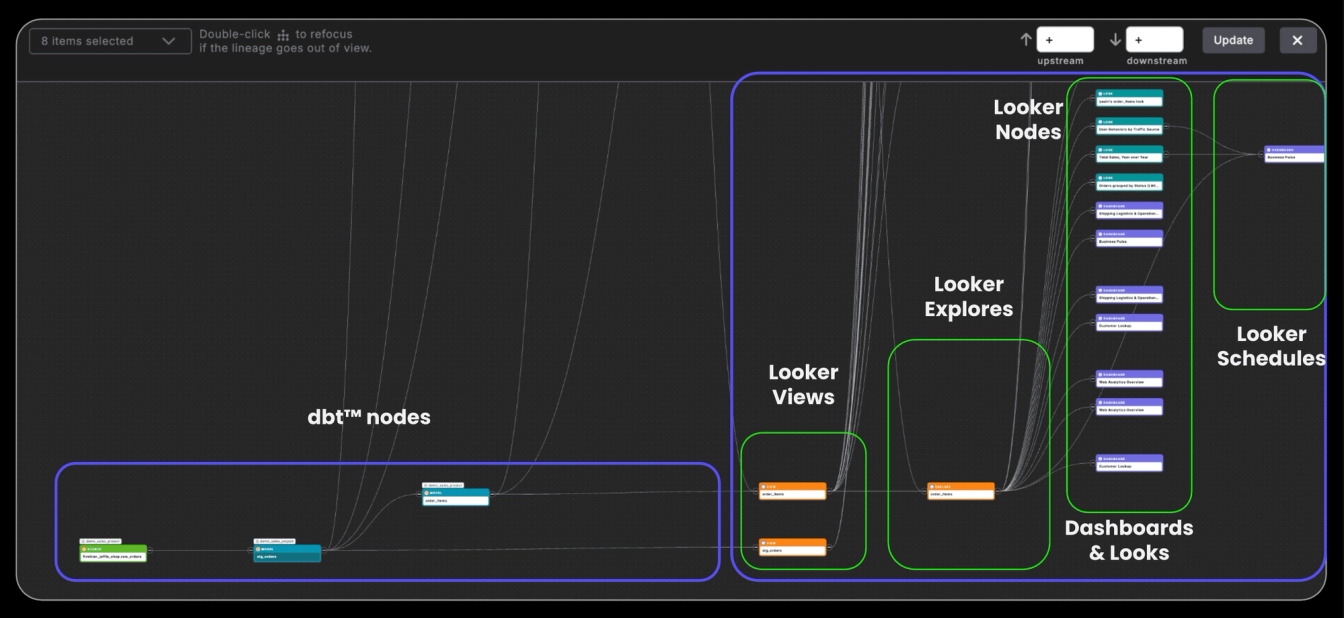
This isn't just about seeing connections—it's about understanding impact. Before making a breaking change to a core dimension table, you can identify every Looker dashboard that relies on it. This visibility transforms how teams approach schema changes, turning potential disasters into planned migrations.
CI/CD Integration: Catch Breaking Changes Before Production
Paradime's Bolt CI/CD framework takes lineage analysis a step further with automated impact detection. When you open a pull request that modifies dbt™️ models, Bolt automatically generates a lineage diff that highlights which Looker assets will be affected by your changes.
Column-Level Lineage Diff in Action
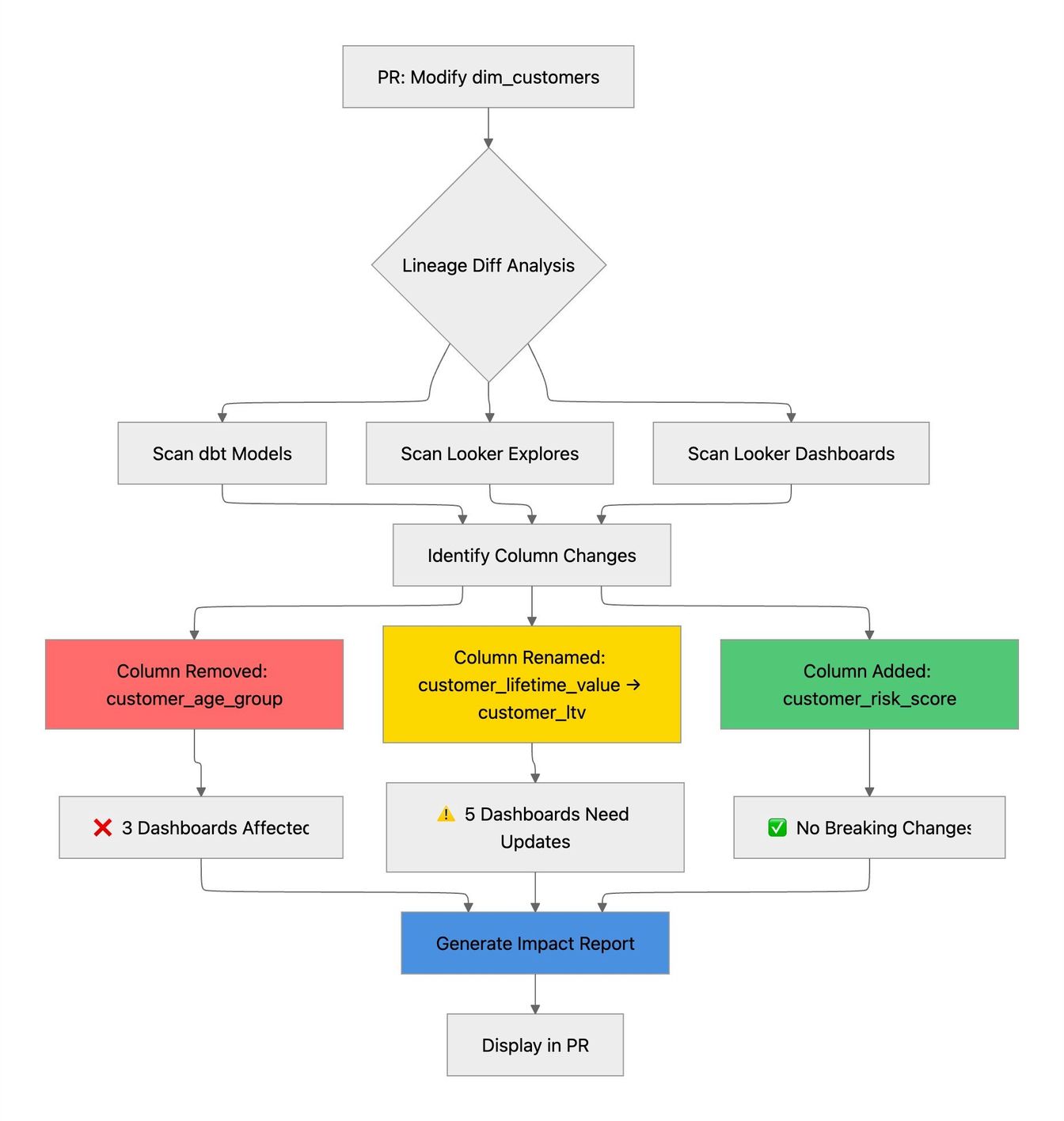
Consider a common scenario: you're refactoring a customer dimension table and decide to rename customer_lifetime_value to customer_ltv for consistency. Without column-level lineage, this seemingly simple change could break multiple Looker dashboards without warning.
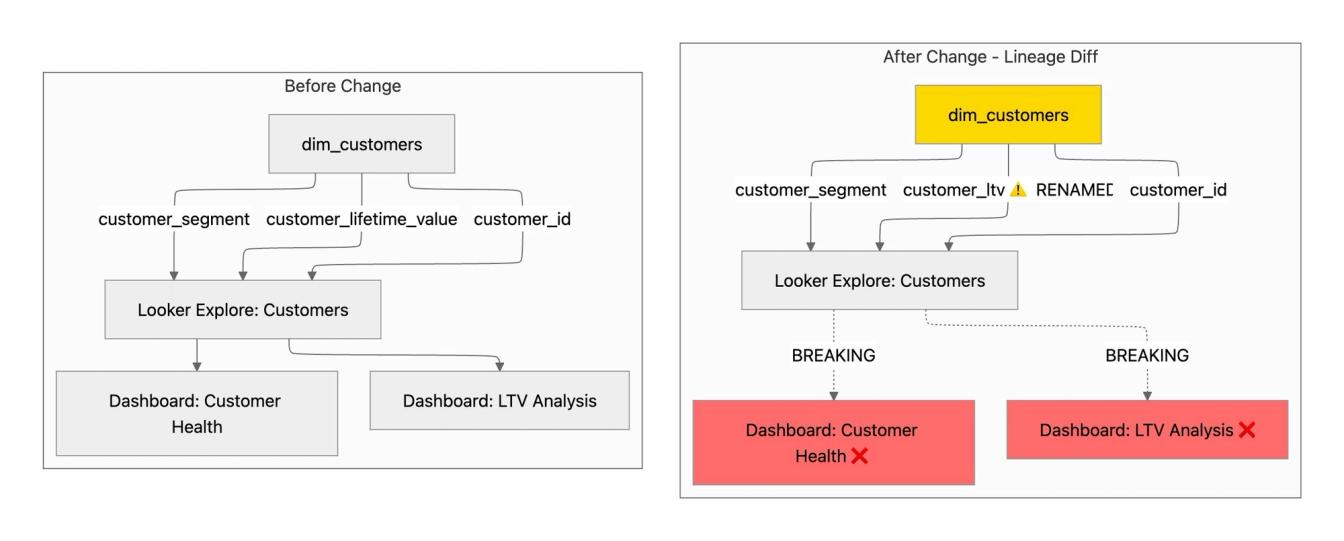
The lineage diff immediately surfaces that:
- Two Looker dashboards reference the renamed column
- The "Customer Health" dashboard uses
customer_lifetime_valuein three tiles - The "LTV Analysis" dashboard has five charts dependent on this field
- Both dashboards will break upon deployment
This pre-deployment analysis operates as an early warning system. If your PR removes a column that feeds into a C-suite revenue dashboard, you'll know before merging—not after deployment when executives are reporting discrepancies. The lineage diff appears directly in your pull request, enabling code reviewers to assess both technical correctness and business impact simultaneously.
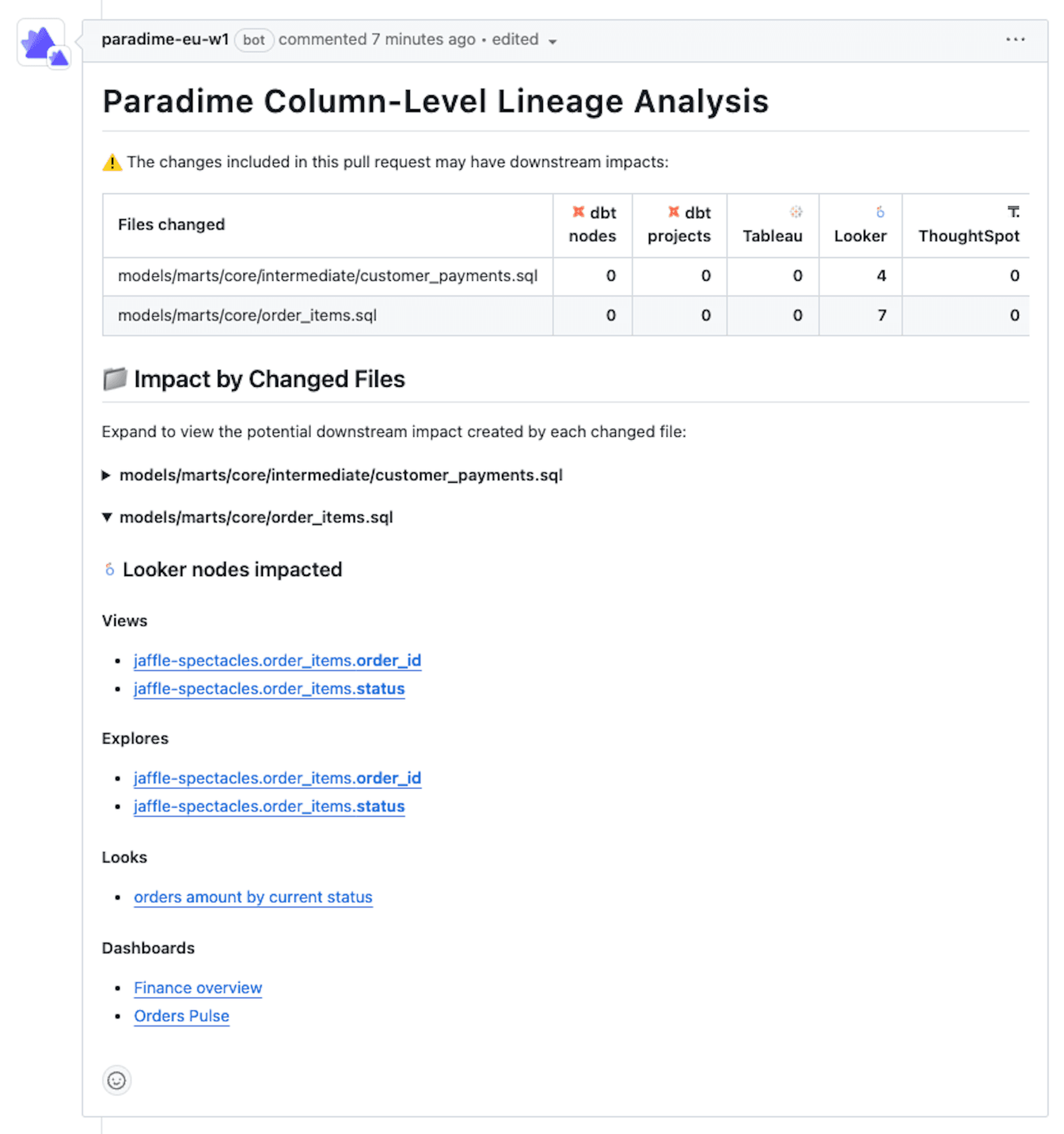
Complete Impact Visibility
Here's how column-level lineage diff tracks changes through the entire pipeline:
The Development Velocity Advantage
The productivity gains from Paradime's Looker integration compound across three dimensions:
Reduced Context Switching: Analytics engineers no longer need to toggle between dbt™️ models, Looker's IDE, and Slack threads asking "is anyone using this model?" Everything lives in a unified workspace where code and impact analysis coexist.
Faster Debugging: When a Looker dashboard breaks, tracing the issue back through multiple transformation layers can consume hours. Paradime's lineage graph provides instant root cause analysis, showing exactly which dbt™️ model change triggered the downstream failure.
Confident Refactoring: Technical debt accumulates when teams fear touching legacy code. With complete visibility into Looker dependencies, analytics engineers can refactor confidently, knowing they've accounted for every downstream impact.
DinoAI Advantage: Keeping dbt™️ models and LookML views in sync is a common problem. But clever users are now using DinoAI’s built-in code and warehouse context to generate LookML view updates whenever dbt™️ models change and then copy and paste that in the LookML editor.
Preventing Inadvertent Downtime
The most valuable aspect of Paradime's Looker integration isn't what it enables—it's what it prevents. Every organization has experienced the cascade of problems that follows an unexpected dashboard outage: emergency meetings, hurried rollbacks, eroded trust in data systems.
Paradime's integration creates multiple guardrails against these incidents. The lineage preview catches issues during development, the CI/CD diff catches them during code review, and the comprehensive dependency tracking ensures that no downstream asset goes unaccounted for.
Implementation and Ongoing Value
Setting up the Looker integration requires connecting the LookML repo and API credentials and a one-time configuration in Paradime's integration settings. Once established, the system maintains synchronization automatically, updating lineage graphs as both your dbt™️ project and Looker content evolve.
For teams scaling their analytics infrastructure, this integration becomes increasingly valuable. As model counts grow and dashboard complexity increases, the manual tracking approaches that worked for small teams become untenable. Paradime's automation ensures that comprehensive impact analysis remains feasible regardless of scale.
Conclusion
Paradime's Looker integration represents a fundamental shift in how analytics engineering teams operate—from reactive firefighting to proactive impact management. By providing real-time lineage visualization, automated CI/CD analysis, and comprehensive dependency tracking, it enables analytics engineers to develop faster while maintaining the reliability that business stakeholders demand.
In an environment where data downtime directly impacts business operations, tools that prevent incidents before they occur aren't just convenient—they're essential infrastructure.
Interested to Learn More? Try Out the Free 14-Days Trial
One AI-native workspace to build, ship, and monitor dbt™ — without the tool sprawl.
More Articles
Join industry leaders winning with DinoAI agents
Data engineers and analysts at the most AI-native startups and enterprises use Paradime's DinoAI agents everyday to become market leaders.