Introducing Paradime State
Paradime State brings state-aware orchestration to both humans and agents in Paradime Bolt. Humans and DinoAI agents can now take advantage of building, running, and fixing data pipelines with only what's changed with no usage fees on what is skipped (aka. DATT pricing on dbt Cloud™.)

Kaustav Mitra
·
5
min read

Today every dbt™ run rebuilds everything you select, whether or not anything changed. dbt™ State fixes that - but on dbt Cloud™, where every skipped model costs $0.094 per day. Paradime State brings the same capability as an alternative to the market inside Paradime Bolt. There is no per-skip charge and no second vendor to manage.
What is dbt™ State?
dbt™ State is a feature from dbt Labs that checks every model in your pipeline before building it. On each run, it compares a model’s SQL logic and upstream data freshness against what was built before. If nothing meaningful has changed, it skips the rebuild or copies the result from another environment instead of doing the work again.
There are three possible outcomes per model:
SKIP - the model’s table already exists in the target schema, its SQL hasn’t changed, and no upstream source has received new data beyond a configured freshness window. dbt™ drops the model from the run entirely. Tests on skipped models reuse their previous pass or fail result without re-querying the warehouse.
CLONE - the same model, with the same logic and fresh data, exists in another environment (production, CI, or a colleague’s schema). Instead of rebuilding it, dbt™ copies it with a zero-copy clone operation. On Snowflake, this takes milliseconds.
BUILD - the SQL changed, or an upstream table received new data, or dbt™ can’t prove the existing version is still correct. The model builds normally.
The change detection is based on the structure of the SQL, not the raw file text. For example, reformatting a query, adding a comment, or renaming an alias produces the same structure and doesn’t trigger a rebuild. This is a step beyond the older state:modified selector, which compared file bytes and would rebuild on even a text change.
dbt™ State also has its own limits. select * views always rebuild because dbt™ can’t determine which columns they return without checking the upstream table. However, with DinoAI you can convert select * statements into explicit columns as DinoAI has the full context of your warehouse. In that case, the state management becomes explicit than implicit. On BigQuery, models over external sources always rebuild because BigQuery doesn’t expose last-modified timestamps for them. The same applies for warehouses like Motherduck. So when in doubt dbt™ would take the conservative approach and rebuild.
Paradime Bolt
Paradime Bolt is Paradime’s orchestration layer for running data pipelines and agents. This includes state-aware dbt™ pipelines in production. It handles scheduling, CI/CD, monitoring, and alerting from a single interface. You can create schedules through a UI or as code in YAML, run standard, deferred, or Turbo CI jobs, and connect to Snowflake, BigQuery, MotherDuck, Redshift, and other data warehouses.
Bolt comes with a 99.9% uptime guarantee. It supports cron schedules, event-based triggers (on merge, on job completion, via API), and integrates with Slack, Microsoft Teams, PagerDuty, Datadog and incident.io for notifications. Teams migrating from dbt Cloud™ can import all their jobs with one click.
Until now, Bolt ran every selected model on every run or skipping models if state:modified+ flagged anything — the same limitation as dbt Core™ v1.x itself.
But that changes today.
Launching Paradime State
Starting today, Bolt supports state-aware orchestration on top of dbt Core™ v2.0 - dbt™’s new Rust-based CLI, that used to be called dbt™ Fusion. We call it Paradime State. When you use dbt Core™ v2.0 on Paradime to run data pipelines, this is enabled by default, and then the Decision Engine evaluates every model before building it and makes the same skip, clone, or build decisions that dbt™ State makes on dbt Cloud™.
dbt™ run without Paradime State
Here is how a warm run looks after editing one model:
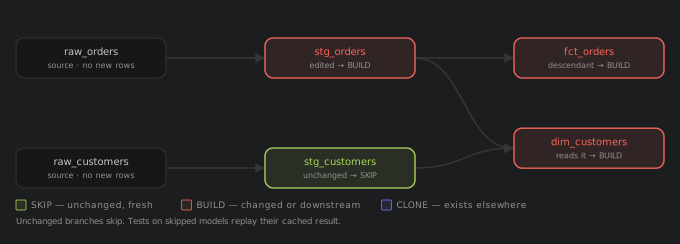
stg_orders was edited and it builds. Its downstream models fct_orders and dim_customers are built too. stg_customers was unchanged and is skipped. Tests on skipped models are also replayed with their cached result.
dbt™ development using production schema
And here is the day to day developer use-case with a fresh branch pointing at an empty schema:
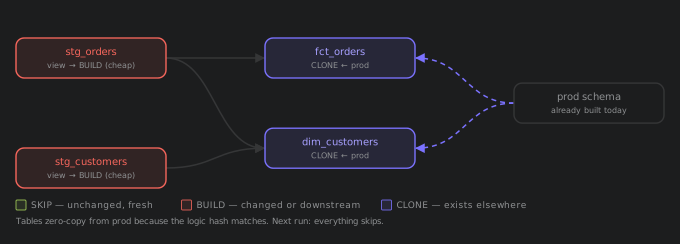
Views are cheap to build. Tables that already exist in prod with the same logic are copied instead of rebuilt. And on every next run they are skipped.
What we’ve built?
The dbt Core™ v2 engine is a compiled Rust binary with no Python imports or plugin systems. We also did not want to forking the binary and maintaining a custom version ourselves.
So we’ve built Paradime State as a decision engine that sits on top of dbt Core™ v2.0. It calls dbt™ through its normal command line and makes decisions on which models to build, skip, or reuse.
There are four ways that our Decision Engine skips more than a plain dbt™ state comparison:
We compare SQL logic, not text. Reformatting, adding comments, or renaming an alias won’t trigger a rebuild. The query still does the same thing, and the logic fingerprint says so.
We check data freshness at source. We asks the warehouse directly when each source table was last updated. If the raw data hasn’t moved since the last run, the whole branch stays skipped. Not all warehouses publishes this information but we have built Paradime State to be compatible with any warehouse.
We reuse objects, including across jobs. If the object exists in the target schema, its logic hasn’t changed, and its parents haven’t received fresh data beyond the configured
lag_tolerance, then we’d reuse the model — even when a different job built it.We track column-level lineage. If you added a column to a staging model and no downstream model reads that column, then those models are skipped entirely. Only models that use the column are rebuilt.
Across our test projects, these four decision criteria together push the skip rate to roughly 85% or 85% of your models and tests are skipped per run.
However, if we can’t decide if a model is safe to skip, we would build it. Because we believe that wrong data is worse than saving warehouse compute.
Zero vendor lock-in
Paradime supports dbt™’s own dbt™ State service. dbt login works inside Paradime, and if you want to use dbt Cloud™’s state service, you can.
What we’re adding is a second option. You can use Paradime State instead, with no dbt Cloud™ login and no per-skip metering. The same decisions running on your own stack using the Paradime State machine.
The choice is yours as both options are available in Bolt and you can pick the one that fits your team’s budget, existing contracts, and vendor preferences.
What about state:modified+?
Before any state machine existed, teams built their own version with the state:modified+ selector. You’d store the manifest.json from the latest dbt™ run, point dbt™ at it, and dbt™ rebuilds anything whose SQL changed, plus everything downstream. It’s free, it ships with dbt™ Core, and thousands of teams run it in production today.
However, it gets a few things wrong in both directions.
Take one scenario where you added a comment to stg_orders, and raw_customers received new data this hour.

Models are rebuilt when it shouldn’t: stg_orders is rebuilt because the text diff is different, and drags fct_orders and rpt_revenue with it. Models are skipped when it shouldn’t: dim_customers is skipped because its SQL didn’t change but its source data did and reports now show stale numbers.
The root cause is simple. state:modified+ only compares SQL text. It can’t tell a cosmetic edit from a real change, and it never checks whether source data has changed.
Here is the same scenario under Paradime State:

The comment produces the same logic fingerprint and the orders branch is skipped. The freshness check catches the new customer data and the customer branch is rebuilt. As a result, both directions are handled correctly.
The difference in detail looks like:
state:modified+ | Paradime State | |
|---|---|---|
Adding a comment | Rebuild | Skip |
New source data | Not detected | Detected |
Unused new column | Rebuild all downstream | Skip models that don’t read it |
Clone from prod | No | Yes |
Test results | Re-run all | Replay cached |
Manifest storage | Do it yourself (S3 or GCS) | Automatic |
Object reuse | None | Full, including across jobs |
When in doubt | Stale data risk | Full rebuild |
Estimated cost for a production example
Here’s what the pricing looks like on a production project on Snowflake, running once every hour.
The setup
500 models. 50 are materialized as tables (marts), 450 are views, and 100 data tests running on a Snowflake Small warehouse (2 credits/hr at $2/credit = $4/hr). We assumed marts take 3 minutes each to build, views take 1 minute each, and a schedule runs every hour, 24 runs a day, 8,760 times a year. We compare price for two team sizes, because dbt Cloud™’s tiers are split between a five-person team Starter ($100 per user per month, capped at five seats and one project), and a team of six or more, who would be on the Enterprise tier, where pricing is negotiated. Paradime seats are $180 per user per month at any size.
What happens each hour
New data lands in a couple of source systems. About 10 models sit downstream of them and are rebuilt - 1 mart and 9 views, 12 minutes of model time. With dbt™ running four threads, the run finishes in about 5 minutes of wall clock, and the warehouse is billed for those 5 minutes. Everything else skips. Code changes deploy once a day and ride along on whichever run follows the merge.
Both platforms make the same decisions, so the warehouse does identical work: about $0.33 per run, $2,920 a year. Now, how much do you end up paying for state?
Paradime Cost
Bolt seats are $180 per user per month. So if there are 5 data engineers in the team that need to create or update data pipelines then the cost is fixed at $10,800.
At 5 people, the total cost of ownership (TCO) comes to $10,800.
At 10 people, the TCO becomes $21,600. A predictable cost with no hidden charges.
dbt Cloud™ Cost (based on what we understand)
The dbt Cloud™ cost is a cascading waterfall of taxes you pay on top of warehouse compute and it goes as follows.
DATT
dbt™ State’s usage counts each distinct table you don’t build once per UTC day, no matter how many runs touch it. As a result, at an hourly cadence with over 24 runs a day, nearly every model and every test records at least one skip or reuse each day.
That’s roughly 600 DATT × $0.094 = $56.40 per day, or $20,586 a year, whether you are on Starter and Enterprise alike. You pay this charge for re-using models and tests.
In other words, any cost you save on compute is compensated by paying dbt Cloud™ for it, which is a bit mental.Seats
dbt Cloud™ Starter (up to five people). Five seats at $100 per user per month is $6,000 a year.dbt Cloud™ Enterprise (six people and up). dbt™ does not publish an Enterprise price; however, from experience we understand that negotiated Enterprise deals typically land between $200 and $400 per seat per month.
If we take the $300 midpoint, then ten seats is $36,000 a year.Model Builds.
dbt Cloud™ also charges for successful model builds - 15,000 a month is included on Starter, and 100,000 (or more) on Enterprise.
This scenario builds about 7,200 models a month (10 per run × 24 × 30) for one pipeline. But most Enterprise teams do about 0.5M model builds per month. This adds another $60,000 a year to the bill.
So eventually, the total bill for dbt Cloud™ comes around $116,586 when on Paradime its $21,600!

At ten people, dbt Cloud™ Enterprise runs 5.4 times Paradime’s cost for modest use case.
What else do you get on Paradime?
State-aware orchestration is one part of the platform. And there are two other capabilities that are relevant here as follows:
DinoAI agents. Paradime’s agent works across the IDE, Slack, and API. It reads your dbt™ project structure, warehouse schema, and lineage to write models, fix errors, generate documentation, and refactor code. It’s the #1 harness for data engineering and data operations in the market today.
Self-healing pipelines. When a Bolt schedule fails, DinoAI can diagnose the failure, generate a fix, validate it by running tests, and open a PR automatically. In Slack, every failed pipeline notification comes with a “Fix with DinoAI” button. For pipelines you want fully hands-off, you can enable self-healing mode: the agent runs on every failure without human intervention, across multiple repositories if your dbt™ mesh has them. The fix targets are determined by tracing the dependency chain through column-level lineage.
Free data catalog. When you run jobs on Paradime Bolt, you get a data catalog for free with column-level lineage. You can bring both your dbt™ data products and integration data products into the Paradime catalog. You can distribute that data catalog to your business users and it’s available for free. Also business users are free on Paradime, so you can have unlimited business users.
None of these are available on dbt Cloud™.
Picking the right option.
Three paths exist today.
Paradime State. Runs on dbt™ Core 2.0. No usage based charges; predictable cost with seats charged at $180 per user per month at any team size. Logic-level change detection, source freshness checks, object reuse across jobs, and column-level lineage. Plus DinoAI agents and self-healing pipelines. The lowest total cost of the three, with every decision correct.
dbt Cloud™. Available across Core 1.7 through Fusion. You pay for every skipped model at $0.094/DATT on top of seats and every successful-build past the threshold. Starter seats are $100 per user per month, capped at five seats and one project; teams larger than that move to custom-priced Enterprise, where seats typically land at $200 to $400 per user per month.
state:modified+. Built into dbt™ Core at no extra charge but not free in practice. You still run it somewhere, so you pay for Paradime, dbt Cloud™, or the infrastructure you host and maintain yourself, and you manage the manifest storage on top. The text diff gets decisions wrong in both directions: cosmetic edits trigger rebuilds, and fresh source data goes undetected, which means stale reports. There is no support for cloning, test reuse, or object reuse.
Conclusion
If you are on dbt Cloud™, this is a great reason to migrate. Having humans and AI agents available in your orchestrator is now table stakes and dbt Cloud™ is lagging far behind on that. If you are looking for a modern orchestrator, or exploring how to run agents in the wild, you can sign up on Paradime for free and start exploring.

