dbt™ Failure Alerts to PagerDuty: On-Call Setup for Analytics Engineers
On-call for data teams with PagerDuty: automatic incident creation from failed dbt™ runs, urgency-based alerting, escalation policies, and mobile notifications—real incident response for analytics engineering.

Fabio Di Leta
·
6
min read
Send dbt™ failure alerts to PagerDuty and actually wake someone up when pipelines break. On-call escalation, urgency levels, mobile notifications—proper incident response for data teams.
The Problem
Your revenue pipeline dies at 2 AM. Nobody gets alerted. Morning team discovers it at standup when finance asks why yesterday's numbers are missing.
This is why data teams don't have real on-call yet. Failures drop into Slack. Maybe someone sees them. Maybe not. Critical production breaks look identical to test noise.
Hook Paradime to PagerDuty and failed runs trigger actual alerts. Escalation policies. Mobile notifications. The full on-call infrastructure your app team has been using for years.
What You Need
Paradime:
Admin access
Bolt scheduler running
Production dbt™ schedules
PagerDuty:
Admin or manager permissions
API Access Keys
Services configured for data alerts
Escalation policies set up
How It Works
Bolt hits PagerDuty's Events API when runs fail. PagerDuty handles the rest—routing, escalation, notifications. Your data engineers get the same on-call treatment as SREs.
Setup
1. Generate PagerDuty Integration Key
Log into PagerDuty → Integrations → API Access Keys
Click Generate API Keys
Copy the key. Don't lose it.
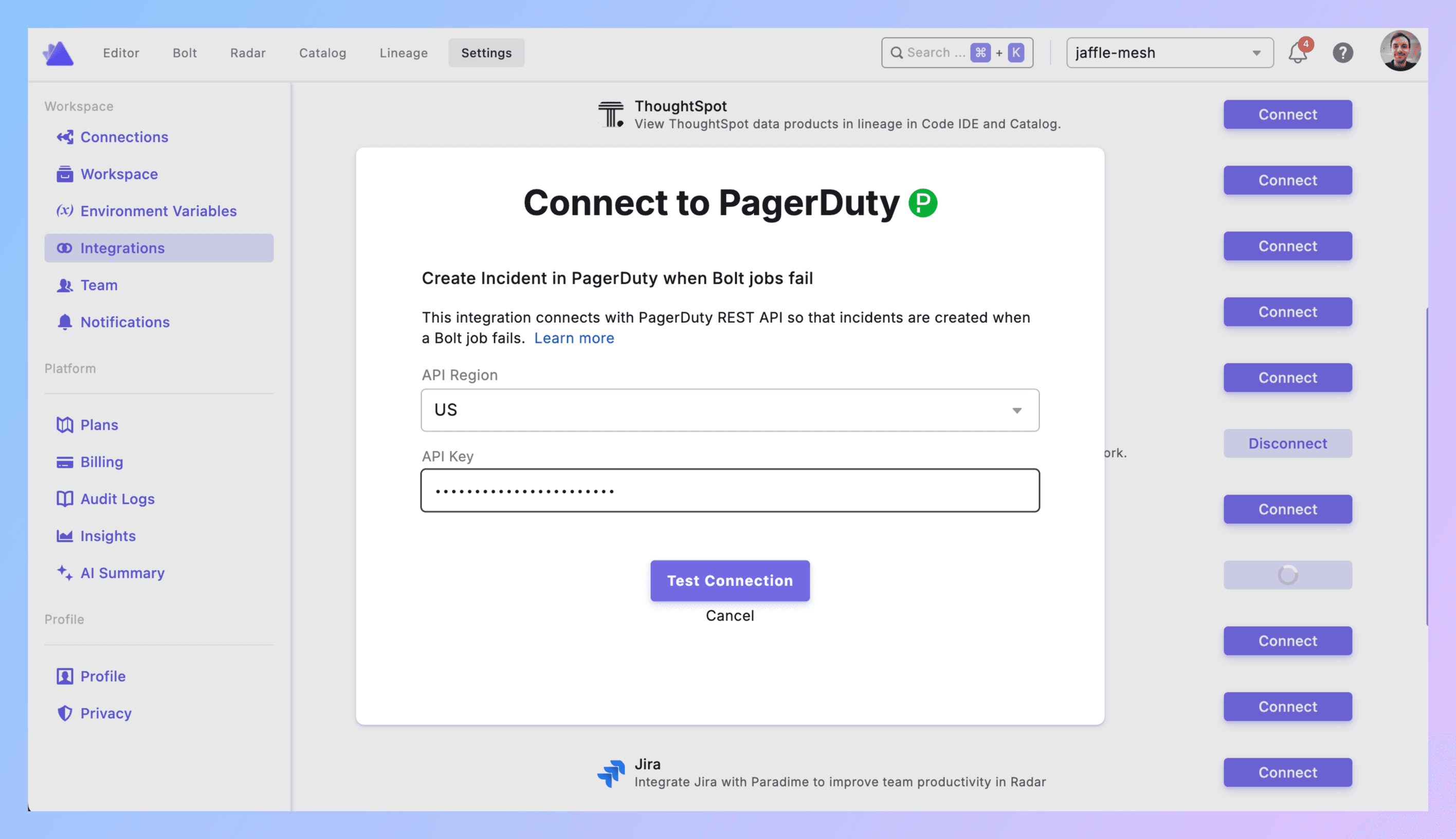
2. Connect to Paradime
Paradime → Settings → Integrations → PagerDuty
Select your API region. Paste the integration key. Click Connect.
Green checkmark? Good.
3. Add Trigger to Schedule
**Bolt → Schedules** → pick your schedule.
Configure dbt™ commands (dbt run --select tag:critical or whatever).
Triggers integration → Add Integration → PagerDuty
4. Configure the Alert
From Email: Email address the incident appears to come from. Use your PagerDuty-registered email.
Incident Type: Major Incident or custom types from your PagerDuty setup. Use "Major Incident" for production breaks.
Impacted Service: Which service gets hit. Pick "Data Alerts" or whatever you've named your data platform service in PagerDuty.
Urgency: High or Low
High = immediate notifications, wakes people up
Low = notification without urgent alerting
Priority: P1 through P5 (or custom)
P1 = revenue pipelines down, customers affected
P2 = critical models broken, stakeholders impacted soon
P3+ = matters but not urgent
Escalation Policy: Which on-call rotation gets this. Default or custom policies from PagerDuty.
Select Users (optional): Notify specific people beyond escalation policy. Finance lead for revenue failures. Product manager for feature metrics.
Click Confirm.
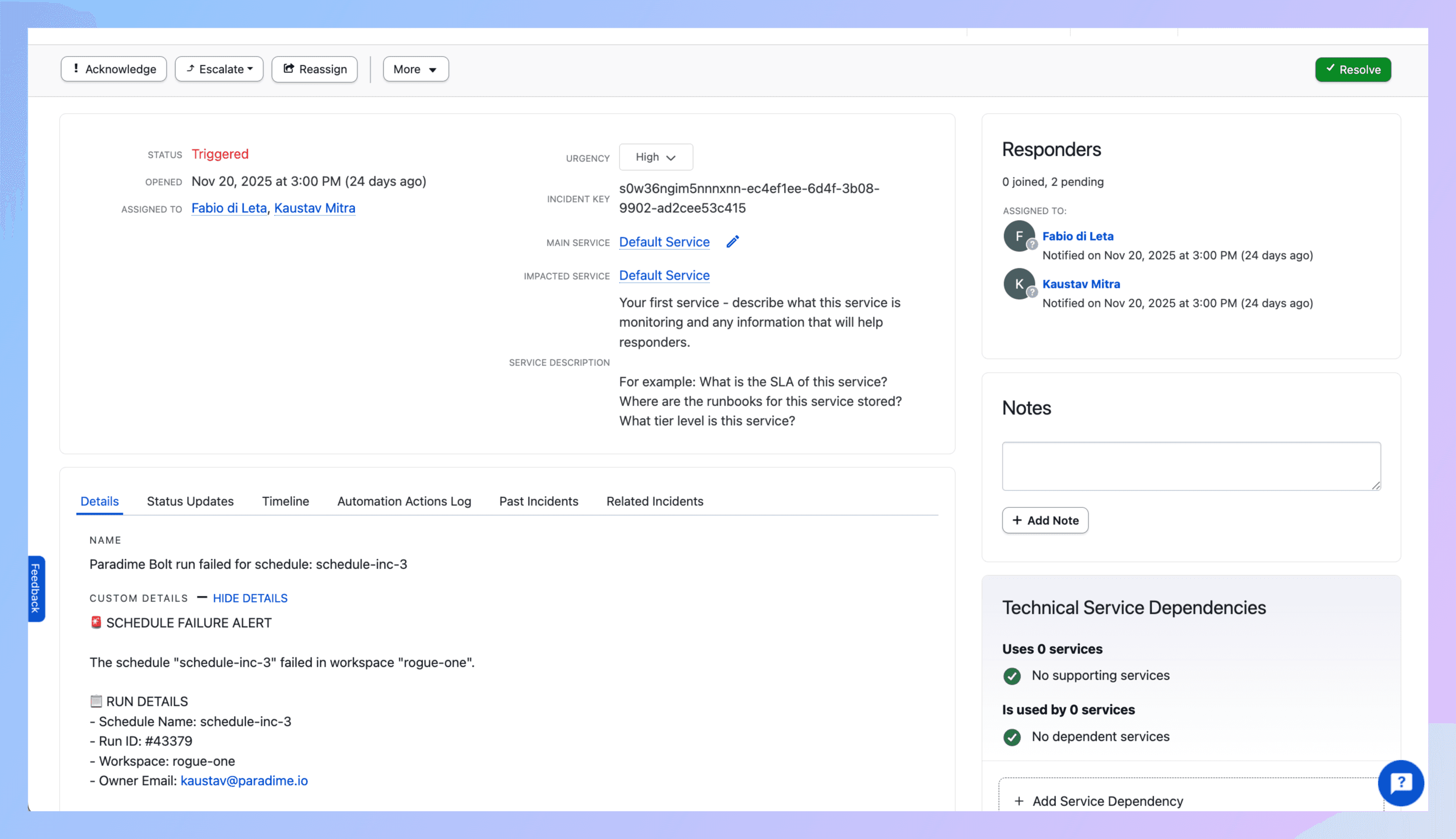
5. What Gets Created
Run fails → PagerDuty incident appears with:
Title showing schedule and workspace
Description with:
Direct link to Paradime run logs
Run ID, timestamps, commands
Branch info
AI summary of what broke
Your urgency/priority/type settings
Auto-assignment via escalation policy
6. Test It
Make a test schedule. Break it (reference nonexistent_table).
Run it.
Check PagerDuty. Incident should exist.
Check your phone. If urgency = High, you should've gotten alerted.
Check the incident details. Link to Paradime logs should work.
Debugging:
No incident? Integration key wrong or connection failed.
Wrong priority? Review your config.
Nobody alerted? Check urgency = High and escalation policy is correct.
No mobile alert? PagerDuty mobile app not configured properly.
7. Production Rollout
Add triggers to critical schedules. Match urgency to actual impact.
Define your priority levels. Write them down.
Best Practices
Don't alert for everything. High urgency means someone gets woken up. Reserve it for actual production breaks. Dev environment failures? Low urgency or no PagerDuty at all.
Map priorities to business impact. P1 = customer-facing dashboards down. P2 = important stakeholder reports missing. P3 = internal analytics delayed. Make it concrete.
Use escalation policies properly. First responder doesn't answer in 5 minutes? Escalate to backup. Backup doesn't answer? Escalate to manager. Build real on-call coverage.
Scope your schedules strategically. Running dbt build on everything in one schedule? Split it. Critical revenue models in one schedule (High urgency). Marketing attribution in another (Low urgency). Control what alerts you by controlling what runs together.
Route data pipeline incidents to PagerDuty correctly. Data incidents shouldn't alert app engineers. App incidents shouldn't alert data analysts. Use different services and escalation policies.
Integrate with existing on-call. Already using PagerDuty for application monitoring? Add data pipelines to the same system. Use different services but same escalation backbone. Your on-call schedule can cover both.
Set up PagerDuty integration for dbt™ and Paradime per environment. Production gets High urgency with P1/P2 priorities. Staging gets Low urgency with P3/P4. Dev doesn't alert at all.
Use mobile app religiously. PagerDuty incident escalation for analytics engineering only works if people acknowledge incidents. Install the app. Configure push notifications. Treat it like your app team does.
Track on-call metrics. Time to acknowledge. Time to resolve. Incidents per week. Number of escalations. If you're alerting too much, you have quality problems. If you're not alerting enough, you have observability problems.
Real Example
1:47 AM - dbt run --select tag:customer_analytics executes.
1:52 AM - dim_customers fails. Upstream API changed schema without notice.
1:52 AM - Trigger fires.
1:53 AM - PagerDuty incident P-12345 created:
Title: "dbt™ Production Failed - Customer Analytics"
Urgency: High
Priority: P1
Service: Data Platform Alerts
Escalation: Data Engineering On-Call
AI summary: "dim_customers failed—column customer_tier missing from API response"
1:53 AM - Marcus (primary on-call) gets alerted. Phone rings. Push notification. SMS.
1:55 AM - Marcus acknowledges incident in PagerDuty app.
1:58 AM - Marcus clicks Paradime link. Reviews logs. Sees API schema change.
2:10 AM - Marcus adds conditional logic to handle missing column. Commits. Reruns.
2:15 AM - Run succeeds. Marcus resolves incident in PagerDuty. Notes: "API schema changed, added fallback logic."
Next day - Team reviews incident. Adds schema validation to API ingestion. Updates on-call runbook with API vendor contact.
Get Started
Test schedule. Break it. Get alerted.
Define urgency and priority mappings with your team.
Add trigger to one prod pipeline with High urgency. Experience getting alerted. Adjust if needed.
Expand to all critical schedules.
Set up proper on-call rotation. Data pipelines are production systems. Treat them like it.
Links:


