BigQuery UNDROP SCHEMA: How to Restore Accidentally Deleted Datasets (Now GA)
Learn how to restore a deleted BigQuery dataset using UNDROP SCHEMA or the datasets.undelete API — now GA as of February 2026. Covers limitations, IAM requirements, post-restore checklist, and what it means for dbt™ teams.

BigQuery UNDROP SCHEMA: How to Restore Accidentally Deleted Datasets (Now GA)
TL;DR: As of February 23, 2026, BigQuery's dataset restoration feature is generally available. You can recover a deleted dataset — including all its tables, properties, and security settings — using the UNDROP SCHEMA DDL statement or the datasets.undelete REST API, as long as you're within your time travel window. Read on to understand exactly how it works, what gets restored automatically, and where you still need to do manual cleanup.
The Problem That Needed Solving
Dropping a table in BigQuery has had a recovery path for years — time travel lets you clone it back from a historical snapshot. But deleting an entire dataset was a different story. Until now, it meant one of three painful outcomes: reconstruct from backups, re-run every pipeline from scratch, or file a support ticket and hope for the best.
If you've ever run a Terraform destroy in the wrong workspace, triggered a cleanup script against prod, or fat-fingered a bq rm -r command, you know exactly what that feels like. The dataset undelete feature closes that gap.
How It Works
The recovery mechanism sits on top of BigQuery's existing time travel infrastructure. When a dataset is deleted, BigQuery retains its full state — all objects, dataset-level properties, and IAM bindings — for the duration of your configured time travel window. By default that's 7 days, configurable between 2 and 7 days.
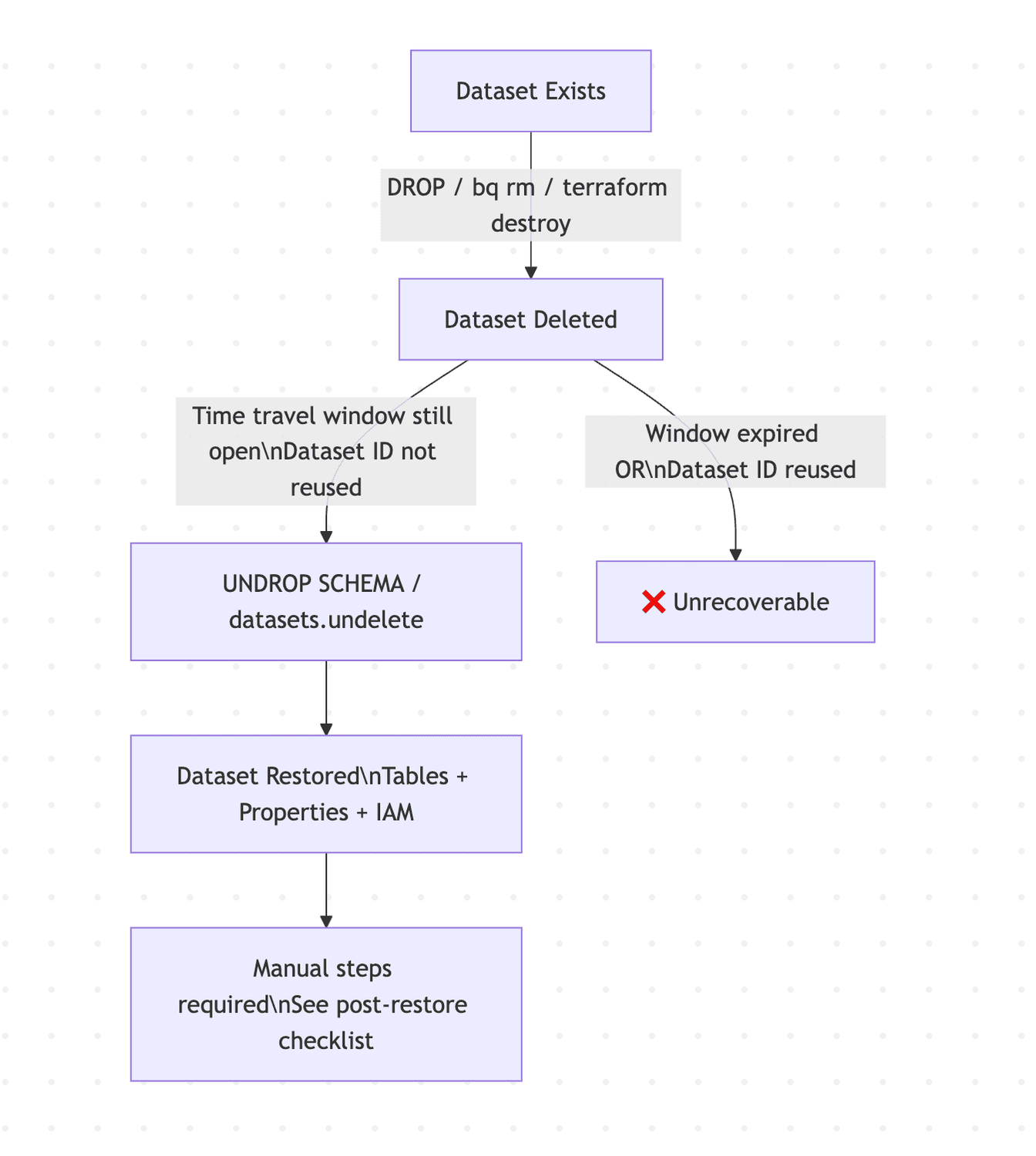
Two conditions kill your recovery window: the time travel window expiring, or creating a new dataset with the same ID in the same region. Either one and the original dataset is gone for good — though you may still be able to recover individual tables from the deleted dataset in some cases.
Running the Restore
Method 1: SQL DDL (UNDROP SCHEMA)
The fastest path. Open the BigQuery console, run it against the right project and location, and you're done.
-- Basic restore (uses default location)
UNDROP SCHEMA my_deleted_dataset;

-- With explicit location — recommended, especially in multi-region setups
UNDROP SCHEMA my_deleted_dataset OPTIONS (location = 'EU');
Always specify location explicitly. If you have two deleted datasets with the same name in different regions and don't specify, the API picks one at random.
Method 2: REST API (datasets.undelete)
For automation or programmatic recovery workflows, use the datasets.undelete REST method. The same location-pinning advice applies here.
Required IAM Permissions
You need the BigQuery User role (roles/bigquery.user) on the project, which covers two specific permissions:
bigquery.datasets.createon the projectbigquery.datasets.geton the dataset
This is intentionally a low-privilege requirement. Recovery operations shouldn't need admin-level access, and this design reflects that. Custom roles work here too if you need tighter scoping.
What Gets Restored — and What Doesn't
This is where assumptions get people into trouble. The restore is not a perfect rollback. Know what's automatic and what requires manual intervention before you declare the incident resolved.
Automatically restored:
- All tables and their data (within the time travel window)
- Dataset-level properties (labels, default expiration settings, location)
- IAM bindings and security settings
Requires manual action after restore:
Materialized views need to be manually refreshed. They don't auto-refresh on dataset restoration.
Authorized views, authorized datasets, and authorized routines need to be reauthorized. There's a nuance here: authorization deletions take up to 24 hours to propagate in BigQuery. So if you restore within 24 hours of deletion, reauthorization may not be necessary — but Google's own guidance is to always verify it regardless. Don't skip this step.
Logical views cannot be restored via UNDROP SCHEMA directly. You either undelete the containing dataset or recreate the view manually.
Analytics Hub linked datasets — any subscriber links that referenced the deleted dataset are broken. Subscribers need to re-subscribe manually.
Business / policy tags — not restored. Reapply from your data catalog.
BigQuery CDC-enabled tables — the dataset and table data come back, but CDC background apply jobs do not resume automatically.
Security principals — IAM bindings are restored as-is. If any principals were deleted between the dataset deletion and restoration, those bindings reference non-existent entities and will need cleanup.
Search index visibility — restored datasets can take up to 24 hours to appear in BigQuery search results.
The Landmine: Reusing Dataset IDs
This is the failure mode most likely to bite teams in practice:
If you delete a dataset and then create a new dataset with the same ID in the same region, you permanently lose the ability to undelete the original.
In CI/CD pipelines, integration test environments, or any workflow where datasets are torn down and recreated with stable names, this is a real risk. If your deployment automation drops and recreates a dataset as part of a normal cycle, the undelete window for the prior version closes immediately.
For dbt™ Core and dbt™ Cloud users: if you're using dataset names as environment identifiers (e.g. analytics_dev, analytics_prod) and any pipeline step involves a DROP + CREATE cycle on those datasets, be deliberate about whether you actually need to drop the dataset container itself versus just managing the tables within it. Most dbt™ workflows only drop and recreate tables, not the dataset — but it's worth auditing if you use custom macros or pre/post hooks that touch dataset-level operations.
The One Operational Detail People Will Miss
Once a dataset is successfully undeleted, it cannot be deleted again for seven days. The individual entities within it — tables, views, routines — can be deleted normally. But the dataset container itself is locked from deletion for a week.
If your workflows require shorter turnaround (e.g. ephemeral environments that need to be fully torn down and recreated within 7 days), you'll need to contact Google Cloud Support to request an exception. Plan for this if you're using dataset undelete in any automated recovery or testing workflow.
Error Reference
Error | Meaning |
|---|---|
| A live dataset with that name already exists in that region. UNDROP won't overwrite or merge. |
| Time travel window has expired, dataset never existed, or wrong location specified. |
| Insufficient IAM permissions. |
Post-Restore Checklist
Don't close the incident until you've run through this:
- Verify table counts and spot-check row counts against known baselines
- Manually refresh all materialized views
- Verify and reauthorize authorized views, datasets, and routines — use
INFORMATION_SCHEMA.OBJECT_PRIVILEGESto audit - Re-subscribe any Analytics Hub linked datasets
- Reapply business/policy tags from your data catalog
- Check CDC-enabled tables and restart background apply jobs if needed
- Audit IAM bindings for stale or missing principals
- Account for up to 24 hours before the dataset surfaces in BigQuery search results
Time Travel Window Configuration
The undelete window is bounded by your time travel configuration. Default is 7 days (168 hours). Set it explicitly at the dataset level for anything production-critical:
ALTER SCHEMA my_dataset
SET OPTIONS (
  max_time_travel_hours = 168  -- 7 days, the maximum
);
The minimum is 48 hours. For production datasets there's no good reason to go below the maximum. The storage cost delta is negligible relative to the recovery capability it provides. Full details in the time travel documentation.
FAQ
Can I restore a dataset to a different project or region? No on both counts. The dataset is restored to its original project and region only.
What if I don't know when the dataset was deleted? Query INFORMATION_SCHEMA.JOBS or your Cloud Audit Logs to find the deletion event and determine whether you're still within the time travel window.
Does this work regardless of how the dataset was deleted? Yes — whether it was a bq rm, a Terraform destroy, a DDL DROP SCHEMA, or a console click, the mechanism is the same. The cause of deletion doesn't matter; what matters is the time travel window and the dataset ID not having been reused.
What about datasets deleted by automated pipelines or dbt™? Same rules apply. dbt™ Core and dbt™ Cloud don't have any special interaction with this feature — undelete operates at the BigQuery layer regardless of what tool triggered the deletion.
Summary
Dataset undelete is now GA in BigQuery as of February 23, 2026. The implementation is clean, the IAM requirements are sensible, and the SQL interface (UNDROP SCHEMA) makes it accessible without needing to touch the REST API for most use cases.
The limitations are real — materialized views, authorized resources, CDC tables, Analytics Hub links, and business tags all require post-restore manual work. And the 7-day re-deletion lock is an operational constraint worth planning around. But for the most common scenario — someone dropped a production dataset that shouldn't have been dropped — this gets you back to a working state in a single SQL statement.
Official docs: Restore deleted datasets — BigQuery
Interested to Learn More? Try Out the Free 14-Days Trial
One AI-native workspace to build, ship, and monitor dbt™ — without the tool sprawl.
More Articles



Join industry leaders winning with DinoAI agents
Data engineers and analysts at the most AI-native startups and enterprises use Paradime's DinoAI agents everyday to become market leaders.